
Knowledge base SEO means optimizing your help articles so search engines and AI systems can find, understand, and cite them directly—pulling in long-tail traffic from people searching for specific fixes and reducing support tickets. The key is getting the fundamentals right: using canonical URLs to prevent duplicates, structuring content with direct answers followed by clear steps, and regularly checking Search Console to see which queries actually land on your articles. Treating your knowledge base as a content asset with the same editorial care as your blog, rather than just a cost center, is what gets you into featured snippets and AI answers.
Knowledge Base SEO: 4 Step Playbook Using Google Rules and GOV.UK
Knowledge base SEO means structuring, writing and marking up help centre content so search engines and AI systems like ChatGPT and Perplexity can find it, understand it and cite it directly. Done properly, it pulls in long-tail organic traffic from people searching for exact fixes, and it cuts support tickets because customers find the answer before they open a chat. Get the basics wrong (duplicate URLs, thin articles, missing schema) and even brilliant documentation stays invisible. Tools like AI visibility audits and Google Search Console show you exactly where that invisibility is happening.
***
TL;DR: >- Ensuring all help articles have canonical URLs and reducing duplicates with proper redirects is crucial to prevent missed indexing and ranking issues.- Structuring content with direct, concise answers followed by clear, numbered steps improves both search visibility and user engagement for support queries.- Regularly auditing Search Console query data helps identify mismatched titles and improve click-through rates by aligning content with actual user search phrasing.- Incorporating descriptive, stable URL slugs and implementing accurate breadcrumb data significantly boost crawlability and hierarchical understanding.- Updating outdated content promptly through redirects or clear labeling maintains trust and prevents old URLs from damaging your search presence.
***
Table of Contents
- What does knowledge base SEO actually cover?
- Why does a well-optimised knowledge base pay off?
- How should you structure your help centre's information architecture?
- How do you handle duplicate and variant KB URLs?
- What content template actually gets help articles crawled and cited?
- How should you write title tags and headings for KB pages?
- What internal linking pattern actually surfaces the right answer?
- Which schema types should you use, and which should you avoid?
- Do you need a sitemap, and how should robots.txt behave?
- How do you use Search Console to keep improving?
- What's the fastest way to apply all of this?
- Does mobile performance actually change how a help centre ranks?
- Do engagement metrics really influence knowledge base rankings?
- How should you handle outdated or deprecated help content?
- The perspective that gets missed in most KB SEO advice
- Get a free AI audit before you rebuild anything
- Sources
- FAQ
What does knowledge base SEO actually cover?
Knowledge base SEO covers every help centre article, FAQ page and product doc that answers a specific customer task, from "how do I reset my password" to "why is my invoice wrong". If a page exists to resolve a support query rather than sell something, it falls inside this scope.
Ownership tends to split three ways, and that split causes most of the problems you'll see later in this guide. Support teams write the content because they know the tickets. Product teams own the underlying features the articles describe, so they know when something changes. Content or SEO teams understand search intent, headings and structured data but rarely get invited into the process until traffic is already falling. The fix isn't reorganising your org chart. It's making sure someone checks Search Console for your help subdomain every month, because that's where you'll see which queries are actually landing on your articles and which are landing on a competitor's forum thread instead.
Most companies treat their knowledge base as a cost centre to keep tickets down. The ones that treat it as a content asset, with the same editorial rigour as a blog, are the ones showing up in AI answers and featured snippets. That shift in framing is the whole point of this guide.
Why does a well-optimised knowledge base pay off?
A well-optimised knowledge base earns long-tail traffic that your marketing pages never will, because customers search for problems in language your product pages don't use. Nobody types "by accounting software" into Google after they've already bought it. They type "why won't my invoice sync to Xero", and if your help article answers that in the first paragraph, you rank for a query with almost no competition.
That precision also makes help articles unusually good candidates for featured snippets and AI citations. Google Search Central's own guidance on helpful, people-first content makes clear that content resolving a specific task, written clearly, outperforms content padded to satisfy a word count. AI answer engines work the same way: they pull from pages that state the answer plainly near the top, not pages that bury it under three paragraphs of context.
There's a third benefit that rarely gets discussed in SEO circles: engagement data. A help article that answers the question in one screen produces a short time-on-page and a low bounce rate, and both used to be read as failure signals. They aren't. For a support query, "found it fast and left" is success, and it usually correlates with fewer repeat support contacts on that topic.
How should you structure your help centre's information architecture?
Structure your help centre around a stable category hierarchy that mirrors how customers describe their problem, not how your product team organises features internally. A category tree that reads "Billing > Invoices > Failed Payments" will always outperform "Module 4 > Sub-process C" because customers never search using your internal naming.
A few structural rules make the difference between a help centre crawlers can parse and one they struggle with:
- Keep URL slugs descriptive and stable (
/billing/failed-payment-retry, not/kb/article?id=4471), because slugs that change break every external link and internal bookmark pointing to that page. - Implement BreadcrumbList structured data that matches the visible, user-facing hierarchy exactly, then test it with Google's breadcrumb guidance to confirm each ListItem has the correct position and name.
- Audit for orphaned articles regularly. Any page not reachable from a category listing or a contextual link inside another article is invisible to most crawlers and most customers.
Orphaned pages are the silent killer of large knowledge bases. Support teams publish a fix for a specific incident, forget to link it anywhere, and it sits unindexed for years.
How do you handle duplicate and variant KB URLs?
Pick one canonical URL per help article and force every duplicate, whether it's a print view, a filtered variant, or a leftover from a platform migration, to point back to it. Google's guidance on consolidating duplicate URLs treats permanent redirects and rel="canonical" tags as strong signals, while sitemap inclusion alone is a much weaker one. Relying on the sitemap to sort out duplication doesn't work.
Work through canonicalisation as a straightforward checklist:
- Inventory every URL variant for each article, including print pages, mobile-only paths, language versions, and parameter-based filters.
- Choose the single preferred URL for each article based on which version gets the most existing links and traffic.
- Apply 301 permanent redirects from every duplicate to that preferred URL, and update internal links to point there directly rather than through a redirect chain.
- Set rel="canonical" on any remaining variant that must stay live (a print stylesheet view, for instance) so search engines know which version to index.
- Update the XML sitemap so it lists only canonical URLs, never the duplicates.
Migrations are where this usually breaks down. Teams move to a new help desk platform, URLs change wholesale, and nobody sets up redirects because "the old platform's going dark anyway". That old platform's URLs are still indexed and still ranking, so a visitor lands on a dead page instead of your new one. Permanent redirects fix that; a farewell blog post doesn't.
What content template actually gets help articles crawled and cited?
The template that works is short answer first, then ordered steps, then troubleshooting branches for anything that goes wrong. Readers and crawlers both want the resolution in the first two sentences, not after three paragraphs of context about why the problem happens.
Keep to one intent per page. An article trying to cover "how to reset a password" and "how to change your email address" splits its relevance for both queries and usually ranks for neither. Structure it like this instead:
- Open with a one or two sentence direct answer to the exact query.
- Follow with numbered steps, each a single action, written in plain English.
- Add a troubleshooting section for the two or three most common failure points, based on actual support tickets.
- Use descriptive H2s that mirror the phrasing customers actually search, not internal feature names.
Pro Tip: Pull the exact query strings from Search Console's performance report for your help subdomain and drop that phrasing straight into your H2s. Customers rarely search the way your product team writes.
This structure also happens to match what GOV.UK's own content design guidance recommends for public-facing information: plain English, short sentences, and headings that describe the content honestly.
How should you write title tags and headings for KB pages?
Write title tags that describe the specific task, keeping them within the length Google typically displays in full, so the whole promise shows up in search results. "How to Cancel a Subscription" beats "Subscription Management" every time, because it matches the phrasing someone actually types.
A handful of rules keep metadata working rather than fighting the algorithm:
- Put the primary task phrase naturally in the H1, and don't repeat it identically in every H2 underneath it.
- Write meta descriptions that summarise the resolution in one sentence, giving the searcher a reason to click even when your snippet gets overridden by a featured answer.
- Mirror genuine Search Console query phrasing in your H2s rather than guessing at synonyms your customers wouldn't use.
- Avoid keyword stuffing in titles. A title packed with variations of the same phrase reads as spam to both readers and ranking systems.
Test changes properly. Swap a title tag, wait a full reporting cycle, then compare click-through rate in Search Console before deciding whether the new phrasing actually worked. Guessing based on gut feeling wastes the one dataset that tells you the truth.
What internal linking pattern actually surfaces the right answer?
Internal linking works when every category page links down to its articles and every article links sideways to genuinely related tasks, using anchor text that describes the destination rather than "click here" or "learn more". A billing failure article should link to the payment retry article and the invoice download article, because those three tasks cluster around one real customer journey.
Build this deliberately rather than leaving it to chance:
- Add a "related articles" module labelled with the actual task, not a generic "you might also like".
- Link contextually within the body text itself wherever a step references another process, not just in a sidebar module nobody scrolls to.
- Check every published article is reachable from at least one category page or one contextual link elsewhere, closing the orphaned-page gap covered earlier.
Guidance from Cited's own piece on SEO friendly links makes a similar point for documentation specifically: descriptive anchor text does double duty, helping both the crawler understand the destination page's topic and the customer decide whether it's worth the click.
Which schema types should you use, and which should you avoid?
Use Article or TechArticle schema for standard help pages, and FAQPage schema only for genuine multi-question FAQ sections, never QAPage. Google's structured data guidelines note that valid markup can make a page eligible for richer search appearances, and that JSON-LD is generally the easiest format to implement and keep accurate over time.
The mistake that trips up most documentation teams:
- QAPage schema is built for pages with user-submitted answers to a single question, like a community forum thread. Google's own QAPage guidance is explicit that this doesn't fit a standard single-author help article, even when that article has a question-shaped heading.
- Every property in your JSON-LD must describe something genuinely visible on the page. Markup that claims a rating, date or answer the page doesn't actually show risks the whole markup being ignored or penalised.
- Validate every schema change with Google's structured-data testing tools before pushing it live across a whole knowledge base.
Structured data doesn't rescue thin content. A two-line article marked up perfectly in JSON-LD still reads as a two-line article to anyone who lands on it, and to any system judging whether it deserves a citation. Schema signals what the content is; it can't invent depth that isn't there. Cited's guide on Article schema and its companion piece on FAQ schema both walk through implementation with working examples if you want the specifics.
Do you need a sitemap, and how should robots.txt behave?
Large or complex knowledge bases need an XML sitemap listing every canonical URL you want indexed, but submitting one is a hint to search engines, not an instruction they're obliged to follow. Google's sitemap guidance recommends hosting the sitemap at your root domain and keeping it to fully-qualified, absolute URLs that match your canonical choices exactly, not the duplicate variants you redirected away from earlier.
Robots.txt has a narrower job than most teams assume. It manages crawler load and keeps bots away from admin paths, internal search results pages, or staging environments, but it's the wrong tool for hiding content you actually want ranked. A page blocked in robots.txt can still appear in search results without a description if it's linked from elsewhere, which usually looks worse than just leaving it accessible and letting canonical tags do the real work of deduplication.
How do you use Search Console to keep improving?
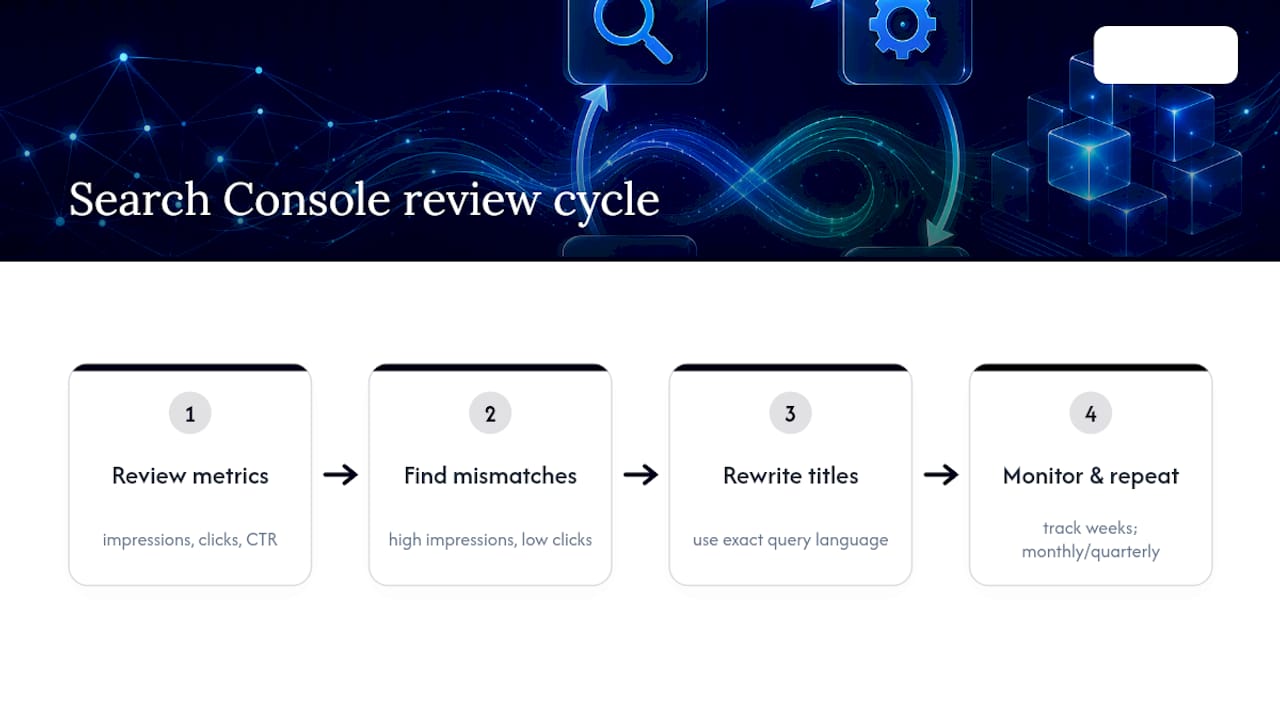
Search Console tells you which queries actually bring people to each help article, and that data should drive your editing priorities more than any keyword tool. Check impressions, clicks and click-through rate for your top help pages monthly, and watch for articles with high impressions but low clicks, which usually means the title tag doesn't match what searchers expect to find.
When you spot a mismatch, rewrite the H1 and title using the exact query language Search Console shows you, then track the same page for the following few weeks to see whether click-through rate moves. Set a recurring review cycle, quarterly at minimum for a large help centre, so this stays a habit rather than a one-off audit.
What's the fastest way to apply all of this?
Work through the fixes in the order they compound, because canonicalisation and structure underpin everything that follows:
- Inventory every URL variant, fix redirects and canonical tags, and implement breadcrumbs with matching JSON-LD.
- Rewrite priority articles using the short-answer-first template, then update title tags and meta descriptions to match real query phrasing.
- Submit your cleaned-up sitemap and confirm robots.txt isn't blocking anything you want indexed.
- Monitor Search Console weekly for the first month, then monthly, and keep editing the pages with the biggest gap between impressions and clicks.
Does mobile performance actually change how a help centre ranks?
Mobile performance changes how a help centre ranks because most support searches happen on a phone, often from someone already frustrated and looking for the fastest possible resolution. A help article that loads slowly or renders badly on a small screen loses that visitor before they read a single line, and repeated fast abandonment on mobile is exactly the kind of signal that drags down an otherwise well-written page.
Page weight is usually the real culprit, not the platform. Help centres accumulate screenshots, embedded videos and third-party chat widgets over years, and each one adds load time nobody notices until they test on an actual 4G connection rather than an office broadband line. Compress images before upload, lazy-load anything below the fold, and avoid embedding video players that load their full script on every page regardless of whether the visitor plays the video.
Tap targets matter more in a help centre than almost anywhere else on a site, because numbered troubleshooting steps often include buttons, links or expandable sections that need to be usable with a thumb, not a mouse cursor. If your troubleshooting accordion requires precision tapping to expand on a small screen, customers give up and open a support ticket instead, which defeats the entire purpose of writing the article.
Test your highest-traffic articles specifically, not just your homepage. A generic sitewide speed audit can hide the fact that your most-visited troubleshooting page, buried under a heavy legacy template, loads three times slower than the rest of the site.
Do engagement metrics really influence knowledge base rankings?
Engagement metrics influence rankings indirectly, through the same signals that influence any page: whether visitors find what they need and whether they come back through search rather than bouncing to a competitor's forum answer. For a help article, the useful engagement metric isn't time-on-page in the way it would be for a blog post.
A customer who lands on "how to cancel a subscription," reads two sentences, and leaves within twenty seconds has probably succeeded, not failed. Interpreting that pattern as a ranking problem and padding the article with unnecessary detail actually makes it worse, because it buries the resolution the customer came for.
What's genuinely worth watching is repeat visits to the same article from the same query, and high impressions paired with a low click-through rate. Both suggest the article isn't matching the actual intent behind the search, whether that's a mismatched title tag or an answer that doesn't appear until several paragraphs in. Pogo-sticking, where a visitor clicks your result, bounces straight back to the search results, and clicks a competitor's page instead, is the pattern to genuinely worry about, because it signals your page failed to answer the query at all.
Track these signals per article rather than in aggregate across the whole knowledge base. A help centre with five hundred articles will always have an average that hides which specific pages are actually losing customers to a competitor's answer.
How should you handle outdated or deprecated help content?
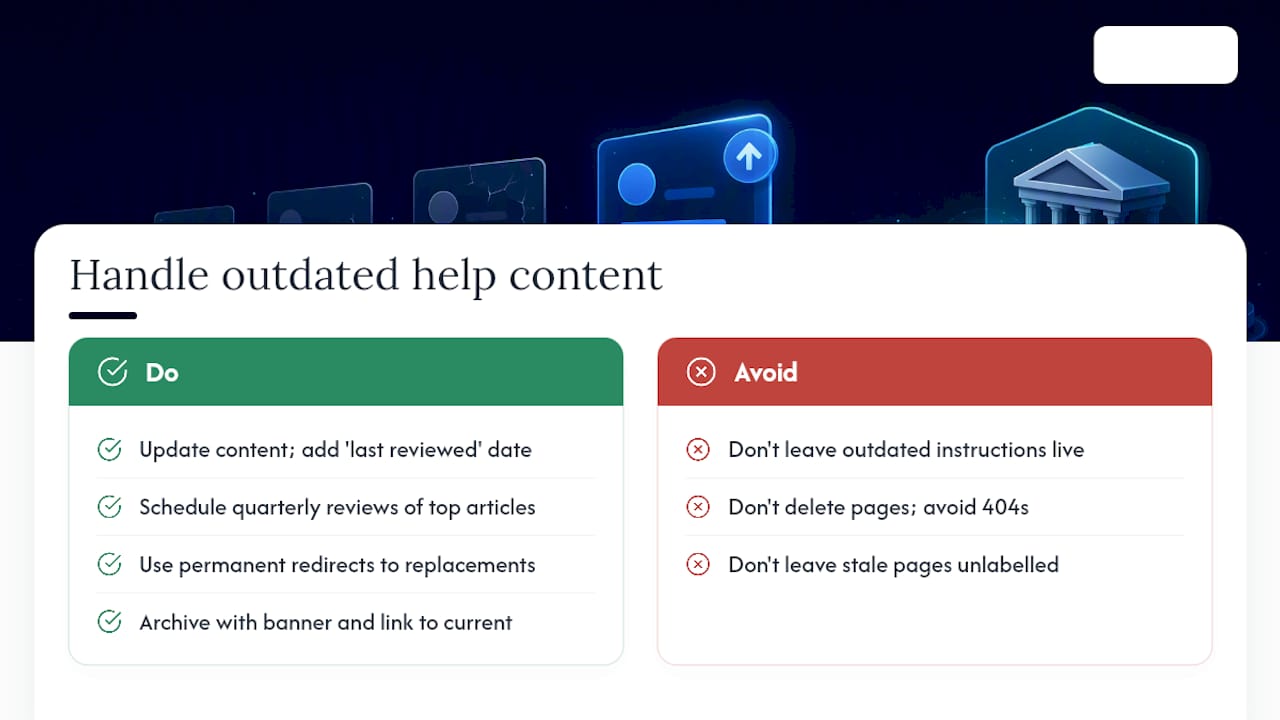
Outdated content should either get updated with a visible "last reviewed" date or be redirected to its replacement, never left live with wrong instructions attached to a feature that no longer exists. A help article describing a cancelled product tier, an old app interface, or a discontinued integration actively damages trust the moment a customer follows steps that don't match what they're looking at.
Set a review cadence rather than waiting for a support ticket to reveal a problem. Product teams should flag documentation impact whenever they ship a change, but that discipline breaks down in practice, so a scheduled quarterly sweep of your highest-traffic articles catches what gets missed. Cross-check each one against the current product before assuming it's still accurate.
When a feature is genuinely gone, don't just delete the article and leave a 404. Redirect it permanently to the closest current equivalent, or to a category page explaining the change, using the same permanent redirect approach that applies to any duplicate or retired URL. A dead link inside a help centre erodes trust fast, particularly when it's reached from an old blog post or a support agent's saved macro that nobody updated.
Archiving rather than deleting sometimes makes sense for regulatory or historical reasons, but archived pages need a clear banner stating the content is outdated and a link to the current version. Leaving a stale article fully indexed and unlabelled, competing for the same query as its replacement, splits your ranking signal between two pages instead of consolidating it behind one.
The perspective that gets missed in most KB SEO advice
Most guidance on knowledge base SEO treats it as a technical checklist: fix your schema, submit your sitemap, done. That undersells the actual problem. The knowledge bases that perform well treat every article with the same editorial discipline as a marketing page, complete with headline testing and a genuine content owner, while the ones that struggle treat documentation as a dumping ground support agents update reluctantly.
The technical layer matters, and Google's own Search Essentials make that clear: crawlable links, structured data that matches page purpose, and content written for people rather than algorithms. But technical hygiene without genuinely useful writing gets you indexed pages nobody wants to read. At Cited, audits routinely turn up help centres with flawless schema and unreadable prose, or brilliant writing sitting behind broken canonical tags that split ranking signal three ways. Neither half works alone.
— Tom Heaton
Get a free AI audit before you rebuild anything
Before you spend weeks rewriting a help centre, find out exactly where it's losing visibility. Cited's Free GEO Audit checks your knowledge base against the technical health, schema, structure and platform coverage issues this guide has walked through, and flags which pages AI search engines like ChatGPT, Perplexity, Gemini, Claude and Copilot are actually able to cite. No card, no account, just a prioritised list of what's broken.
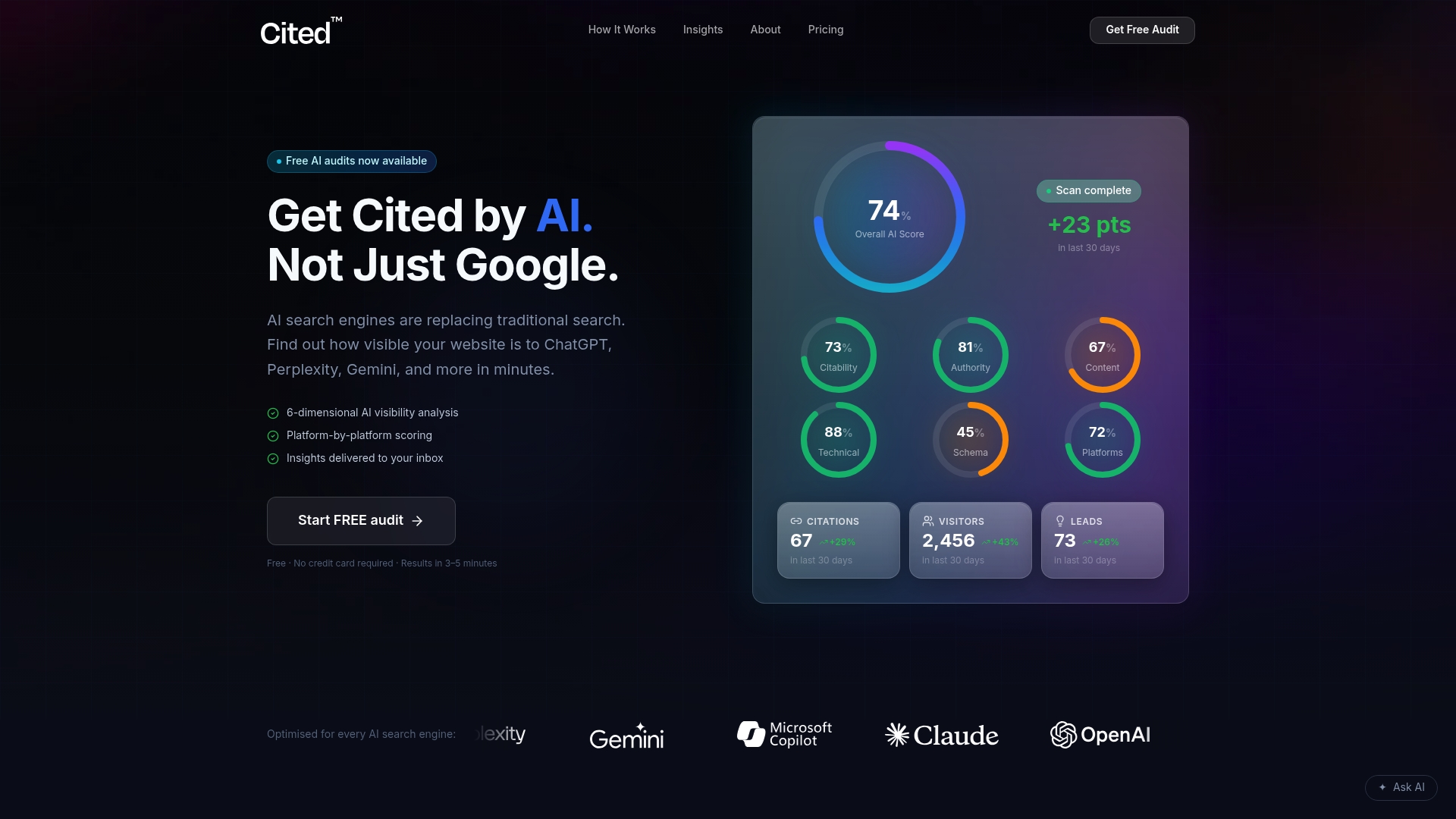
From there, the path is straightforward. Run the audit, fix the highest-impact issues yourself using the checklist above, or hand implementation to Cited directly. Technical Fixes start from £495 as a one-off project for teams that want the redirects, schema and canonicalisation sorted properly without ongoing management. For knowledge bases that need continuous monitoring and iteration as content and search behaviour shift, the AI Optimised plan runs from £995 per month, with custom Enterprise projects available for larger documentation estates. If you'd rather bring in an independent second opinion on general site SEO alongside the AI-specific work, RADKA Advertising's SEO audit service covers that ground too. Start with the free audit and see what's actually holding your help centre back.
FAQ
Is SEO still worth it for a knowledge base in 2026?
Yes. Search Console data on impressions and clicks for help content consistently shows demand for task-specific answers, and AI answer engines pull directly from well-structured help articles when they cite sources. A knowledge base that ignores SEO misses traffic with genuinely low competition, since few sites target exact support queries the way a well-written help article can.
What counts as basic SEO knowledge for someone managing a help centre?
The basics are: one canonical URL per article, a clear H1 that matches search intent, descriptive headings, working internal links, and structured data that matches what's visible on the page. Beyond that, Google's Search Essentials cover the foundational principles that apply to any page type, help content included.
What's a good example of a knowledge base done well for search?
A strong example uses a stable category hierarchy, one canonical URL per topic, a short direct answer at the top of each article, and schema that matches the visible content exactly. Cited's own guides on breadcrumb schema and content optimisation walk through the structural choices that separate a well-indexed help centre from one that struggles to rank.
Has AI made traditional SEO for help centres irrelevant?
No, but it has changed what "ranking" means. AI search engines still rely on crawlable, well-structured, clearly written pages to generate citations, so the fundamentals in this guide (clean URLs, accurate schema, direct answers) matter just as much for AI visibility as for traditional search rankings. Cited's audit specifically checks how citable your help content is across platforms like ChatGPT and Perplexity, not just where it ranks in Google.
Recommended
Ready for your AI score?
See how visible your site is to ChatGPT, Perplexity & Gemini.
Start FREE auditResults in minutes · 100% free