

FAQ schema helps search engines and AI systems recognize question-and-answer content on your pages, but Google removed its rich result display in 2026, so the main benefit now is improved machine readability for AI retrieval rather than a guaranteed search feature. Only add FAQ schema when your Q&A content is genuine, visible in the rendered HTML, and you can maintain a single valid declaration per page. Treat it as a low-cost signal within a broader AI visibility strategy rather than a standalone SEO tactic.
FAQ schema for webmasters: implement and validate

FAQPage JSON-LD remains a valid schema.org type that helps AI answer engines and search crawlers recognise question-and-answer pairs on your pages. Add it when your FAQ content is genuine, visible in the rendered HTML, and you can maintain a single, valid declaration per page. Since Google removed broad FAQ rich result support in its Search Central changelog, the primary return from FAQ schema markup is improved machine readability for AI retrieval systems, not a guaranteed SERP feature. If AI citability matters to your site, treat FAQ schema as a low-cost signal within a wider AI visibility programme rather than a standalone tactic.
***
Table of Contents
- What is FAQPage schema and how does it differ from QAPage?
- When should you add FAQ schema to a page?
- How do you write valid FAQPage JSON-LD?
- How do you implement FAQ schema on a UK site, step by step?
- How do you validate and monitor FAQ schema after deployment?
- What are the best practices for authoring FAQ schema?
- What does research show about FAQ schema's impact on SEO and AI visibility?
- What should you do when FAQ schema fails to validate?
- Key takeaways
- FAQ schema in practice: what most guides miss
- How Cited helps you get FAQ schema right
- Useful sources for implementing and validating FAQ schema
- FAQ
What is FAQPage schema and how does it differ from QAPage?
FAQPage is the schema.org type that labels a page of question-and-answer pairs. The data model works as a hierarchy: FAQPage contains a mainEntity array of Question objects, each of which carries an acceptedAnswer of type Answer. That structure tells machines exactly where each question ends and each answer begins, without requiring them to parse prose.
Required properties for a valid FAQPage declaration:
@type:"FAQPage"at the top levelmainEntity: an array of one or moreQuestionobjects- Each
Questionmust includename(the question text) - Each
Questionmust includeacceptedAnswer, which is anAnswerobject - Each
Answermust includetext(the answer text, which may contain limited HTML)
The distinction between FAQPage and QAPage is practical. Use FAQPage for static pages where each question has a single canonical answer you control, such as a product support page or a help centre article. Use QAPage for community-driven pages where multiple users submit competing answers and votes determine ranking, such as a forum thread or a Stack Exchange-style page. Applying FAQPage to community content, or QAPage to a static FAQ, produces a type mismatch that validators will flag and that AI systems may ignore.
JSON-LD is the recommended format for both types. It sits in a <script> block separate from the visible HTML, which means you can update the markup without touching the page layout.

***
When should you add FAQ schema to a page?
Add FAQ schema when the page contains genuine Q&A content that is visible in the rendered HTML and directly aids user comprehension. Skip it when the markup would misrepresent hidden, dynamically loaded, or promotional content.
Scenario | Use FAQPage? | Reason |
|---|---|---|
Product support page with static Q&A | Yes | Genuine, visible, user-focused content |
Help centre article with factual answers | Yes | Canonical answers, static content |
Transactional page with real customer questions | Yes | Aids comprehension, visible HTML |
Marketing copy framed as Q&A | No | Promotional; violates Google guidelines |
Dynamically loaded answers (AJAX) | No | Not in rendered HTML at crawl time |
Accordion FAQ where answers are hidden in DOM | Caution | Validate rendered output first |
Community forum with multiple competing answers | No | Use QAPage instead |
Boilerplate Q&A added purely for markup | No | Manufactured content; low value |
Google's Search Central documentation confirms that FAQ rich results no longer appear for general sites following the May 2026 update. That change reduces the SERP visual incentive, but it does not change the underlying validity of the schema type for AI retrieval. Shopify's guidance for merchants reflects the same position: FAQ schema still helps search engines identify content, but its direct SERP impact has been limited since 2023, so on-page quality takes priority.
Pro Tip: Before adding any FAQPage markup, run a rendered-HTML check using your browser's "View Page Source" versus "Inspect Element" views. If the answer text does not appear in the rendered DOM, the schema will fail a content-parity check and may be ignored.
***
How do you write valid FAQPage JSON-LD?
Use JSON-LD in a single <script type="application/ld+json"> block, placed in the <head> of the page. That is the format Google and schema.org recommend, and it keeps your markup cleanly separated from the visible HTML.
Below is a complete, annotated example you can copy and adapt:
```json
<script type="application/ld+json">
{
"@context": "https://schema.org", // Required: declares the vocabulary
"@type": "FAQPage", // Required: identifies the page type
"mainEntity": [
{
"@type": "Question", // Required: one object per Q&A pair
"name": "What is FAQ schema?", // Required: the question text, visible on page
"acceptedAnswer": {
"@type": "Answer", // Required: the answer object
"text": "FAQ schema is a structured data type (FAQPage) that labels question-and-answer pairs so AI systems and search engines can parse them directly."
// Required: answer text must match visible page content
// Limited HTML allowed: <a>, <br>, <em>, <strong>, <ul>, <ol>, <li>
}
},
{
"@type": "Question",
"name": "Does FAQ schema still produce rich results in Google?",
"acceptedAnswer": {
"@type": "Answer",
"text": "No. Google removed broad FAQ rich result support in its Search Central changelog. The schema type remains valid and useful for AI retrieval systems, but it no longer generates a visual SERP feature for most sites."
}
},
{
"@type": "Question",
"name": "Where should I place the JSON-LD script block?",
"acceptedAnswer": {
"@type": "Answer",
"text": "Place the script block in the <head> element of the page. Avoid placing it in the <body> or injecting it via JavaScript after page load, as some crawlers may not execute late-injected scripts."
}
}
]
}
</script>
```
The visible-content rule is non-negotiable. Every question and answer in your JSON-LD must appear word-for-word (or as a close equivalent) in the rendered HTML of the page. Markup that describes content the user cannot see will fail validation and may trigger a manual action.
Microdata is the main alternative to JSON-LD, but it creates maintenance problems on most CMS platforms. Microdata attributes sit inline with your HTML elements, so any template change can silently break the markup. More critically, if you use JSON-LD in the <head> and microdata attributes on the same page's HTML, you produce two separate FAQPage declarations, which triggers a duplicate-declaration error.
Pro Tip: Write 5–7 Q&A pairs per page. Fewer than three pairs gives AI systems little to work with; more than ten on a single page can dilute the signal and inflate page weight without proportional benefit.
***
How do you implement FAQ schema on a UK site, step by step?
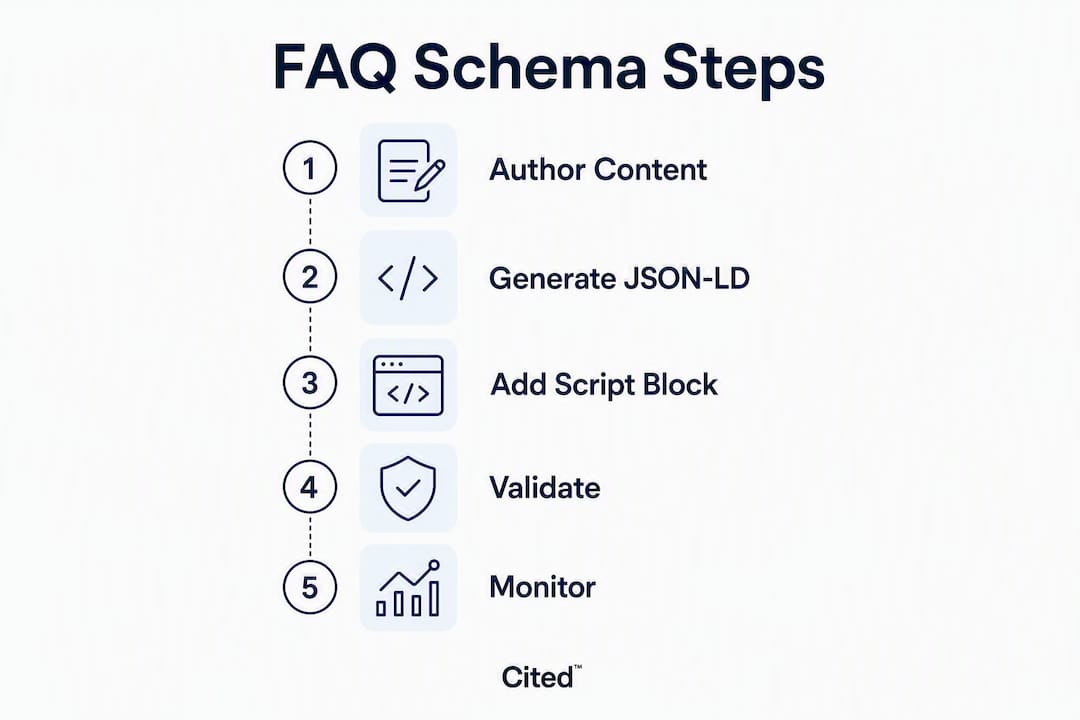
Follow a four-step workflow: author visible FAQ content, generate the JSON-LD, add a single script block to the page head, then validate the rendered output before going live.
Step 1: Author visible Q&A content Write the questions and answers in the page's visible HTML first. Each answer should be 2–4 sentences and stand alone without relying on surrounding context. AI retrieval systems often extract individual Q&A pairs in isolation, so self-contained answers are critical for citation quality.
Step 2: Generate the JSON-LD Write the JSON-LD by hand or use a generator. Hand-writing gives you full control over the text values and avoids the over-generation that some plugins produce. If you use a generator, paste the output into a JSON linter before deployment to catch syntax errors.
Step 3: Add a single script block to the page head Paste the <script type="application/ld+json"> block into the <head> element. Confirm there is exactly one FAQPage declaration on the page. On WordPress, the most common failure mode is a plugin that auto-generates FAQPage JSON-LD alongside a manually added block, producing duplicate declarations that Search Console later flags as SCHEMA_FAQPAGE_DUPLICATE_001.
Step 4: Validate the rendered output Run the page through the Schema Markup Validator and the Google Rich Results Test before publishing. Check the rendered HTML, not just the source, to confirm the answers are present in the DOM.
CMS-specific notes:
- WordPress: If you use a block editor plugin (Yoast, Rank Math, or similar) that outputs FAQPage JSON-LD automatically, disable the plugin's FAQ block output before adding manual JSON-LD via
functions.phpor a custom block. Never run both simultaneously. - Drupal: Use the Metatag or Schema.org Metatag module and configure a single output per node type. Avoid enabling both the module output and a theme-level JSON-LD include.
- Custom builds: Inject the script block server-side in the
<head>template. Avoid client-side injection viadocument.createElement('script')unless you have confirmed your target crawlers execute late JavaScript.
Pre-launch checklist:
- [ ] FAQ content is visible in rendered HTML
- [ ] 5–10 substantive Q&A pairs per page
- [ ] Answers stand alone without prior context
- [ ] Single FAQPage declaration confirmed in rendered source
- [ ] JSON-LD validated on staging before go-live
Pro Tip: On WordPress, use curl -s https://yoursite.com/your-faq-page/ | grep -o "FAQPage" | wc -l to count FAQPage occurrences in the rendered HTML. A result greater than 1 means you have a duplicate declaration to resolve.
***
How do you validate and monitor FAQ schema after deployment?
Validate both syntax and rendered output, then monitor for duplicate declarations or missing required fields. A clean validator result on staging is not sufficient; rendered-HTML checks on the live URL catch issues that static source checks miss.

Error | Likely cause | Diagnostic step | Fix |
|---|---|---|---|
| Plugin + manual JSON-LD both active | | Disable plugin FAQ output or remove manual block |
Missing | Generator omitted | Run Schema Markup Validator | Add |
Answers not in rendered HTML | AJAX/accordion loading | Compare page source vs Inspect Element | Render answers in initial HTML or use SSR |
Microdata + JSON-LD conflict | Both formats active on same page | Search for | Remove microdata attributes; keep JSON-LD only |
Invalid JSON syntax | Trailing comma, unescaped character | JSON linter (e.g. JSONLint) | Fix syntax error and revalidate |
Primary validation tools:
- Schema Markup Validator — (validator.schema.org): checks structural validity against the schema.org specification.
Monitor immediately after deployment, then set a recurring check (monthly is sufficient for stable pages). Search Console will send email alerts for new structured data errors, but duplicate-declaration errors are often silent until the next full crawl cycle.
***
What are the best practices for authoring FAQ schema?
Follow a small set of rules: JSON-LD only, one declaration per page, match visible content, 5–10 substantive Q&A pairs, and write answers that stand alone.
Do:
- Write questions in the phrasing a user would type into a search engine or AI assistant.
- Keep answers to 2–4 sentences. Longer answers dilute the signal; shorter ones may lack the context AI systems need.
- Use allowed HTML tags inside
textvalues:<a>,<br>,<em>,<strong>,<ul>,<ol>,<li>. - Link to authoritative source pages within answers where the link adds genuine value, using descriptive anchor text.
- Centralise FAQPage markup on a single canonical FAQ page rather than fragmenting it across paginated pages.
Do not:
- Use promotional language in questions or answers ("Why is our product the best?").
- Add FAQ schema to content that is not visible in the rendered HTML.
- Run microdata and JSON-LD simultaneously on the same page.
- Duplicate the FAQPage declaration across multiple script blocks.
- Write answers that reference "the section above" or "as mentioned earlier." AI systems extract Q&A pairs in isolation, so answers must be self-contained.
Pagination and multi-page FAQs: if your FAQ spans multiple pages, apply FAQPage markup only to the canonical page. Use rel="canonical" to consolidate signals. Splitting FAQPage declarations across paginated URLs creates fragmented markup that validators treat as separate, incomplete declarations rather than a unified FAQ.
***
What does research show about FAQ schema's impact on SEO and AI visibility?
FAQ schema is a low-cost machine-readable signal that helps AI answer engines and retrieval systems parse Q&A pairs, but it cannot replace content authority or technical site health. That is the consistent finding across schema.org documentation, Google Search Central, and independent audits.
The most significant recent change is Google's removal of broad FAQ rich result support, documented in the Search Central changelog. For most sites, FAQ markup no longer produces a visual SERP feature. Community discussion in technical SEO forums captured early practitioner reactions to this change, confirming that FAQ rich results are no longer appearing for general sites.
The principal win from FAQ schema is now improved machine readability for AI systems and cleaner on-page Q&A management, not a Google SERP feature. AI answer engines such as ChatGPT, Perplexity, and Gemini parse structured Q&A pairs more reliably than unstructured prose, which makes FAQPage markup a direct input to AI citation likelihood.
The practical implication: treat FAQ schema as one element of a broader AI visibility programme. Cited's six-dimension AI visibility methodology includes schema markup as a scored dimension alongside technical health, authority, and platform coverage. Schema alone does not move the needle; it works in combination with content quality and site authority.
Limitations to keep in mind:
- Duplicate declarations can suppress schema output silently until a crawl cycle completes
Pro Tip: *Track AI citation frequency using a tool such as Cited's free AI audit before and after adding FAQ schema. Schema changes alone rarely produce dramatic citation shifts; the audit will show which of the six dimensions needs the most attention.*
***
What should you do when FAQ schema fails to validate?
Run two checks first: a rendered-HTML parity check and a single-declaration scan. Those two steps resolve the majority of FAQ schema failures before you touch any code.
Duplicate declaration fix: If curl -s https://yoursite.com/page/ | grep -c "FAQPage" returns more than 1, you have a duplicate. On WordPress, the most common cause is a plugin generating JSON-LD alongside a manually added script block. Disable the plugin's FAQ output in its settings, clear your cache, and rerun the curl check. If the plugin does not offer a disable option, remove the manual script block instead.
Missing acceptedAnswer.text fix: The Schema Markup Validator will report "acceptedAnswer" is required or "text" is required if the property is absent. Open the JSON-LD, locate the Answer object for the flagged question, and add "text": "Your answer here.". Revalidate immediately.
Dynamically loaded answers: If answers load via AJAX after the initial page response, the crawler sees an empty text value. The fix is to render answers in the initial HTML response (server-side rendering) or to use a JavaScript framework that pre-renders content. Avoid relying on client-side JavaScript to populate answer text.
Microdata/JSON-LD conflict: Search the page source for itemtype="https://schema.org/FAQPage". If that string appears alongside your JSON-LD block, you have a microdata conflict. Remove the itemtype, itemprop, and itemscope attributes from the HTML elements. Keep only the JSON-LD block in the <head>.
Revalidation checklist after any fix:
- Clear server and CDN cache.
- Run
curlrendered-HTML check to confirm single declaration. - Rerun Schema Markup Validator on the live URL.
- Submit the URL for re-indexing in Search Console.
Pro Tip: If you have resolved all validator errors but Search Console still shows warnings after two weeks, request a re-crawl via the URL Inspection tool. Search Console's structured data report does not update in real time.
When errors persist after these steps, a Cited AI visibility audit will identify whether the issue is schema-specific or part of a wider technical health problem. A one-off Technical Fixes engagement (£495) covers schema correction and revalidation as a discrete deliverable.
***
Key takeaways
FAQPage JSON-LD remains a valid, useful signal for AI retrieval systems, but it no longer produces Google rich results for most sites, so deploy it as part of a wider AI visibility programme rather than as a standalone SERP tactic.
Point | Details |
|---|---|
Verify visible content parity | Every Q&A in your JSON-LD must appear in the rendered HTML before you deploy. |
Use JSON-LD in the page head | Place a single |
One declaration per page | Duplicate FAQPage declarations trigger |
Validate and monitor | Use the Schema Markup Validator and Search Console; revalidate after every content or plugin change. |
Cited free AI audit | Cited's free audit scores FAQ schema within a six-dimension AI visibility evaluation and identifies the highest-impact fixes. |
***
FAQ schema in practice: what most guides miss
The conversation around FAQ schema has shifted considerably since Google's deprecation of rich results. Most guides still frame FAQPage markup as a route to SERP features, which is no longer accurate for the vast majority of sites. The more interesting question is what FAQ schema actually does for AI visibility, and the answer is more nuanced than either "it's dead" or "it's essential."
AI answer engines do not simply read your page as prose. They parse structured signals to identify authoritative Q&A pairs they can cite directly. FAQPage markup makes that parsing faster and more reliable. A page with clean, self-contained answers in valid JSON-LD is more likely to be cited verbatim by ChatGPT or Perplexity than an identical page with the same content buried in unstructured paragraphs. That is not a guarantee, but it is a measurable directional advantage, particularly when combined with strong site authority and technical health.
The failure mode I see most often in audits is not bad JSON-LD syntax. It is answers that reference earlier page content, promotional Q&A that violates Google's guidelines, and duplicate declarations from plugin conflicts that nobody noticed because Search Console reporting is slow. Those are fixable problems, and fixing them costs far less than the content investment most sites are already making.
The practical conclusion: add FAQ schema where the content genuinely warrants it, write answers that stand alone, and validate the rendered output rather than the source. Then measure citation frequency, not just SERP features, to understand whether the markup is doing its job.
***
How Cited helps you get FAQ schema right
Most sites that run a free Cited AI visibility audit discover that FAQ schema is one of several fixable issues holding back their citation rate. The audit scores your site across six dimensions, including schema markup, technical health, authority, and platform coverage, and returns a prioritised list of what to address first.
For sites where FAQ schema errors are the primary issue, a one-off Technical Fixes engagement at £495 covers schema correction, duplicate-declaration resolution, and revalidation. For ongoing AI visibility work, the AI Optimised service at £995 per month includes schema monitoring, content optimisation, and monthly citation tracking across ChatGPT, Perplexity, Gemini, Claude, and Copilot. Enterprise projects are scoped and priced individually.
Start with the free audit at cited.best/audit to see exactly where your FAQ schema stands within your wider AI visibility score. If you prefer to talk through the findings first, book a call and a member of the Cited team will walk you through the results and recommend a fix path.
***
Useful sources for implementing and validating FAQ schema
The sources below are the primary references for any FAQPage implementation. Use them in this order: check the schema.org specification first, lint your JSON-LD locally, run a rendered-HTML check, then use the validator tools.
- Schema Markup Validator, Schema.org: the primary tool for structural validation against the schema.org specification
- Google Rich Results Test: tests rich result eligibility; note that Google has signalled deprecation of this tool, so treat it as a secondary check
For government and health sites in the UK, check the GOV.UK Design System guidance on structured content before adding FAQPage markup, as some public sector content standards restrict Q&A formatting in ways that affect schema eligibility.
***
FAQ
What is FAQ schema?
FAQ schema (formally FAQPage on schema.org) is a structured data type that labels question-and-answer pairs on a web page using JSON-LD, so AI systems and search engines can parse them directly without interpreting prose.
Is FAQ schema still relevant in 2026?
Yes, though its role has changed. Google removed broad FAQ rich result support, so it no longer produces a visual SERP feature for most sites. Its value now lies in improved machine readability for AI answer engines such as ChatGPT, Perplexity, and Gemini.
Is FAQ schema worth adding to my site?
Add it when your page contains genuine, visible Q&A content and you can maintain a single, valid declaration per page. The cost is low and the AI visibility benefit is real, but it will not compensate for weak content or poor technical health.
What does FAQ schema code look like?
A valid FAQPage declaration is a <script type="application/ld+json"> block in the page <head>, containing a FAQPage object with a mainEntity array of Question objects, each with a name and an acceptedAnswer carrying a text property that matches the visible page content.
Recommended
Ready for your AI score?
See how visible your site is to ChatGPT, Perplexity & Gemini.
Start FREE auditResults in minutes · 100% free