
AI models cite documentation that puts answers first, includes a visible update date, and provides complete code examples with clear request and response formats. Restructuring your README or docs to lead with direct answers in each section—rather than burying them deeper in the text—significantly improves the chances that ChatGPT, Perplexity, and other AI systems will extract and attribute your content. A 30-day focus on these structural fixes, plus a curated llms.txt file, typically outperforms spending time on schema markup alone.
GitHub README SEO: Fixes for Devs to Win AI Citations in 30 Days
The documentation pages that get cited by ChatGPT, Perplexity, Gemini and Google's AI Overviews share four traits: answer-first paragraphs, visible version dates, a curated llms.txt file, and self-contained code examples wrapped in clean semantic HTML. Schema markup helps entity clarity but rarely moves the needle on its own. Fix the structure first. If you want a baseline reading before you touch anything, run a free AI audit.
***
TL;DR: >- Structuring each paragraph to present an answer first significantly improves AI model extraction and citation likelihood.- Placing a visible last-updated date near the top of the page enhances freshness signals for AI systems.- Consolidating JSON-LD into a single @graph with stable @id references reduces entity fragmentation and corroboration issues.- Accurate code examples with request, response, and error shapes allow AI models to verify snippets effectively.- Regularly updating the relevant documentation pages, metadata, and curated llms.txt entries ensures ongoing citation visibility and prevents content drift.
***
Table of Contents
- What is GitHub README SEO for AI citation, and why does structure matter more than keywords?
- Priority checklist: the fixes to make this week
- How do you write JSON-LD, llms.txt and code examples that AI models can actually use?
- How do you measure whether your changes increased AI citations?
- What's the step-by-step process for adding these fixes to a documentation page?
- Which tools and plugins help automate this work?
- [What does professional implementation cost, and which model suits your team? For expert guidance and hands-on support, consider SearchInsights.Ai's AI visibility services](https://121group.io/services/searchinsights-ai) tailored to optimise your documentation for AI citation.
- How do you keep documentation citable as the underlying repository keeps changing?
- What are the compliance considerations around AI use of your documentation?
- Author perspective: what we see working in practice
- Get your free AI audit and implementation options from Cited
- Sources
- FAQ
What is GitHub README SEO for AI citation, and why does structure matter more than keywords?
"GitHub README SEO" gets searched a lot, but most people typing it actually mean something broader: making documentation and guide pages citable by AI search engines, wherever those pages live. That's the practice covered here, sometimes called AI visibility optimisation or generative engine optimisation (GEO). The standard industry term is AI citation optimisation, and it applies to any documentation page, whether it sits in a GitHub repository, a help centre, or a marketing site's guides section.
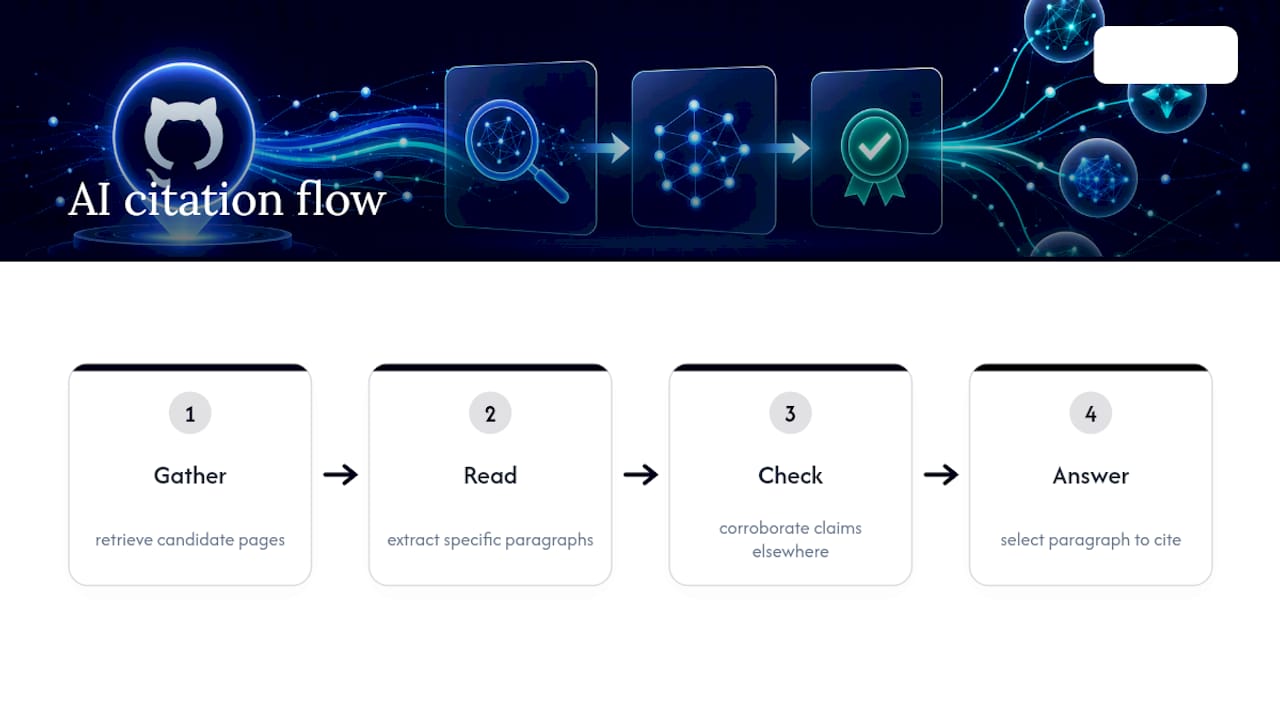
AI systems don't crawl a page and rank it the way Google's classic index does. They retrieve candidate pages, extract specific paragraphs, then check whether those claims are corroborated elsewhere before deciding what to cite. That gather, read, check, answer sequence means a page can be technically excellent and still lose, simply because its best answer is buried in paragraph nine instead of paragraph one. Similarweb's research on citation selection confirms models operate at paragraph granularity, not page granularity. Every section of your documentation is competing individually, not as a whole document.
That reframes the job. You're not optimising a page for a ranking algorithm. You're formatting each paragraph so a language model can lift it cleanly, verify it against other sources, and attribute it back to you.
Priority checklist: the fixes to make this week
Start with structure, not schema. SitePoint's guidance on citation-ready documentation points to the same short list of changes repeatedly outperforming everything else teams try first.
- Open every H2 with the answer. Write the first 40 to 80 words of each section as a standalone answer block: state the fact, then explain it. A model should be able to lift that opening paragraph alone and have it make sense with no surrounding context.
- Show a visible date near the top of the page. A "last updated" or
dateModifiedstamp close to the H1, not buried in a footer, gives freshness-sensitive engines like Perplexity a reason to prefer your version over a stale competitor. - Publish an
llms.txtat your site root. List your canonical documentation URLs in one plain text file so crawlers with limited budgets know exactly which pages matter. - Rewrite code examples with full request, response and error shapes. A snippet with no expected output is not extractable; a model can't verify it against anything.
- Consolidate your JSON-LD into one
@graph. Combine Organization and Person entities withsameAslinks, then reuse the same@idreferences across pages instead of duplicating markup. - Render your answer blocks server-side. If your key paragraphs only appear after client-side JavaScript runs, some retrieval crawlers never see them at all.
Pro Tip: Test extractability yourself before you ship anything: copy a single paragraph out of context into a blank document. If it needs the sentence before or after to make sense, rewrite it. That's the exact test an AI retrieval pipeline is failing when it skips your page.
How do you write JSON-LD, llms.txt and code examples that AI models can actually use?
Structure follows a handful of repeatable patterns, not a long list of edge cases. Get these three right and most of the technical groundwork is done.
JSON-LD @graph. Use a single script block per page rather than scattering multiple <script type="application/ld+json"> tags. A workable pattern nests an Organization object, a Person object for the author, and an Article or WebPage object, each with a stable @id URI so other pages can reference the same entity instead of redeclaring it. Add sameAs links to Wikidata, LinkedIn or Crunchbase entries where they exist. This consolidated @graph approach reduces entity fragmentation, which matters more for corroboration than for ranking.
Be selective about which schema type you apply. Article schema is safe for most documentation. HowTo and FAQ schema only help when the page contains a genuine numbered procedure or real question-and-answer content; forcing FAQ markup onto marketing copy that isn't actually structured as Q&A tends to create a mismatch between the markup and the visible content, which is a bigger liability than having no schema at all.
llms.txt. Place a plain text file at https://yourdomain.tld/llms.txt, one canonical URL per line, with a short comment header explaining why those pages were selected. Keep it curated: a handful of your best, most current documentation pages beats an automated dump of every URL on the site. An llms-full.txt variant, containing full page content rather than links, trades a bigger file for lower crawl friction; it suits smaller documentation sets better than sprawling ones.
Semantic HTML checklist. Run through this before publishing:
- One clear
<h1>, with<h2>elements scoping each self-contained topic - A visible
dateModifiedor "last updated" line near the top - Main content server-rendered, not injected purely by client-side JavaScript
- Code fences tagged with the correct language
- A plain-text fallback for any content delivered primarily through diagrams or images
Element | Purpose | Common mistake |
|---|---|---|
JSON-LD @graph | Entity clarity for Organization/Person | Duplicating entities across pages instead of reusing |
llms.txt | Curated discovery for AI crawlers | Listing every URL instead of the best ones |
Code example | Extractable, runnable reference | Omitting response and error shapes |
dateModified | Freshness signal | Hidden in a footer instead of near the H1 |
A self-contained code example needs five parts: a one-line description of what it does, the setup or dependencies, the request, the expected response, and at least one error case. Leave any of those out and a model has nothing to verify the snippet against, which makes it far less likely to get lifted into an answer.
Pro Tip: *Google's own guidance on generative AI features is blunt about this: there's no special file or markup trick that substitutes for basic crawlability and indexing. Fix those fundamentals before layering on schema.*
How do you measure whether your changes increased AI citations?
Run a small, controlled test rather than changing everything at once and guessing. Pick 5 to 10 pages you're actively editing, plus 5 to 10 matched pages you leave untouched as controls. Record a baseline citation count for both groups using Google's AI features reporting, a citation tracking tool such as Cited's Pages report, and manual checks in Perplexity and ChatGPT. Date the change on the test pages, then compare both groups again after at least 30 days.
- Log the date every time you update
dateModifiedor a version stamp; this is your intervention marker. - Track the funnel in stages: is the page being retrieved at all, is a paragraph being extracted, and is that paragraph making it into a cited answer?
- Compare test pages against controls, not against their own past performance in isolation. Platform-wide shifts can otherwise look like your fixes.
- Give it 30 days minimum before drawing conclusions; AI indexing cycles run slower than classic search.
Three outcomes are common. No change across both groups usually means the sample is too small, or the underlying issue is earned authority rather than structure. A small decline is worth investigating but shouldn't trigger panic: one large study tracking 1,885 pages that added schema found a small relative decline on Google AI Overviews specifically, alongside no clear change on ChatGPT or Google AI Mode, suggesting some of this variance is platform drift rather than a penalty for your changes. A modest, consistent uplift across the test group and not the controls is the signal to roll the same fixes out site-wide.
What's the step-by-step process for adding these fixes to a documentation page?
Work through it as a single pass per page rather than a scattered list of edits.
- Audit the current page. Note where the answer sits, whether a date is visible, and whether code examples run as written.
- Rewrite the opening of each section. Move the direct answer to the first sentence of each H2, keeping it under roughly 80 words.
- Add or update the version stamp. Place a visible
dateModifiedline near the H1, and update the underlying schema value to match. - Fix the code examples. Add request, response and error blocks to any snippet missing them.
- Consolidate schema. Merge scattered JSON-LD blocks into one
@graph, using stable@idvalues you can reuse elsewhere. - Check rendering. Confirm the answer blocks appear in the raw server response, not only after JavaScript executes.
- Add the page to llms.txt. If it's one of your canonical references, list it at the root file.
- Re-test in Search Console. Confirm the page is indexed and eligible for snippet-style features before assuming the AI-facing work will pay off.
Treat this as a template you repeat per page, not a one-off project. A technical SEO review of your site's crawlability is worth doing before this pass, since a page that isn't indexed properly won't benefit from any of the above.
Which tools and plugins help automate this work?
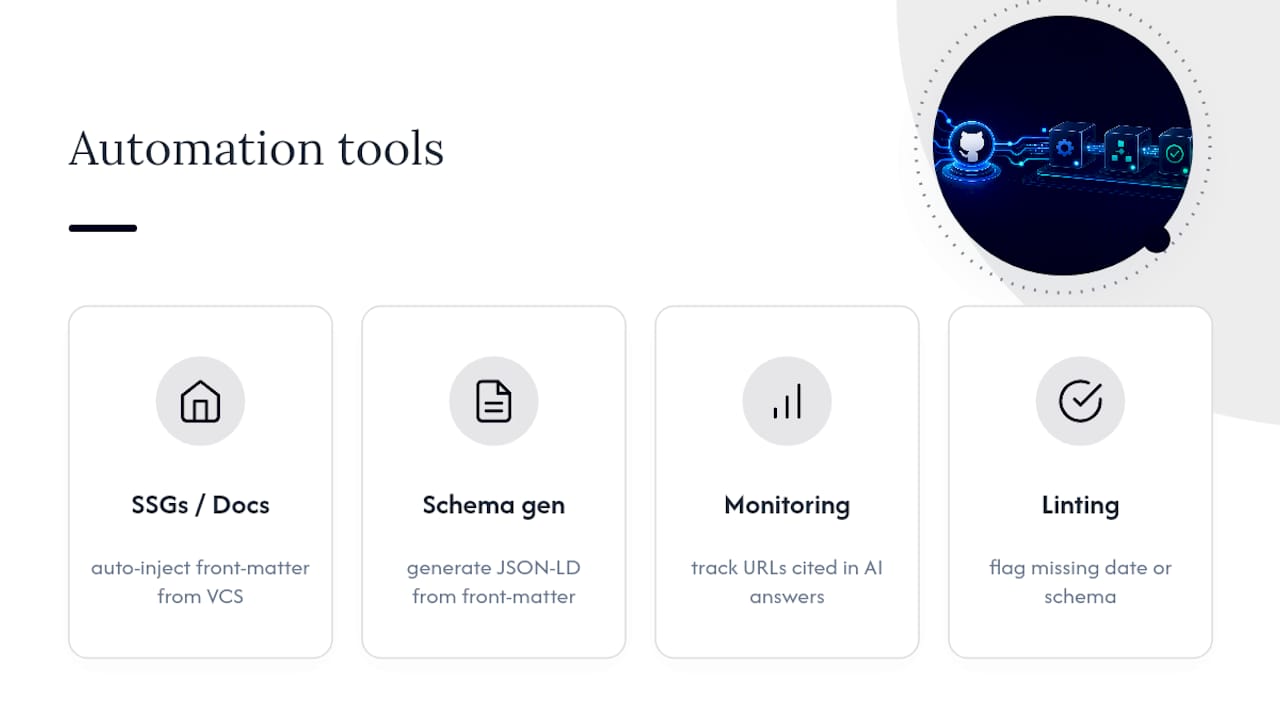
No single plugin replaces the judgment calls above, but several categories of tooling remove the repetitive parts. Static site generators and documentation frameworks that support front matter can auto-inject dateModified from your version control history, so you never forget to update it manually. Schema-generation libraries can build a valid JSON-LD @graph from structured front matter fields rather than hand-coding it per page, which cuts down on duplicate or malformed entities.
For monitoring, dedicated AI citation tracking dashboards, including Cited's own Pages report, show which of your URLs are actually surfacing in AI answers over time, rather than relying on manual spot-checks in each chat interface. Linting tools built for content teams can flag pages missing a visible date or an llms.txt entry as part of a pre-publish check, the same way a spell-checker flags typos.
None of this replaces a human decision about which pages deserve the curated llms.txt treatment or which schema type genuinely fits a page's content. Automation handles consistency at scale; it doesn't handle judgment about what's worth citing in the first place. Teams that try to fully automate the editorial calls tend to end up with FAQ schema wrapped around content that isn't really FAQ content, which creates the exact mismatch problem covered earlier.
What does professional implementation cost, and which model suits your team? For expert guidance and hands-on support, consider SearchInsights.Ai's AI visibility services tailored to optimise your documentation for AI citation.
Three broad pricing models cover most of the market: one-off technical fix projects, ongoing managed subscriptions, and custom enterprise engagements. Which one fits depends on whether you have a backlog of existing pages to fix or an ongoing publishing pipeline that needs continuous attention.
A one-off project suits a team with a defined set of documentation pages and a finite list of fixes: schema consolidation, code example rewrites, llms.txt creation. Cited's Technical Fixes service starts from £495 one-off and covers exactly this kind of scoped work.
An ongoing managed plan suits teams publishing or updating documentation regularly, where citation tracking, schema maintenance and structural review need to happen every month rather than once. Ongoing managed plans include continuous implementation alongside monitoring and start from a monthly fee.
Larger organisations with multiple product lines, regional documentation sets, or complex entity structures across subsidiaries usually need a custom scope. Enterprise options are priced on request, reflecting variation in scope.
Whichever model you're weighing, start with a free audit rather than guessing at scope. It tells you whether your problem is mostly structural, schema-related, or an authority gap that no amount of markup will fix.
How do you keep documentation citable as the underlying repository keeps changing?
Treat citation readiness as a maintenance habit, not a one-time project. The biggest risk to any AI-citable page isn't the initial build, it's drift: a code example that stops matching the current API version, a dateModified stamp nobody updates, an llms.txt file that still lists a page you deleted eighteen months ago.
Tie the update to your existing release process rather than creating a separate SEO task. When a version bumps, update the visible date stamp and the schema dateModified value in the same pull request that ships the change. When an endpoint's response shape changes, update the code example's response block at the same time, not in a later cleanup pass.
Review llms.txt quarterly at minimum. Pages get deprecated, merged or superseded, and a stale entry pointing an AI crawler to a dead or redirected URL wastes crawl budget and can quietly damage the credibility of the pages still listed alongside it. The same applies to your consolidated JSON-LD @graph: if an author leaves or a product gets renamed, the @id references need updating everywhere they're reused, not just on the page where you noticed the problem.
Set a recurring calendar reminder rather than relying on memory. Documentation that was citation-ready at launch and never touched again tends to fall out of favour with freshness-sensitive engines within a couple of quarters.
What are the compliance considerations around AI use of your documentation?
AI systems retrieving and citing your documentation raises two separate questions: whether you want them to, and whether your content is accurate enough to be attributed to you at scale.
On the first question, robots.txt directives and named AI crawler user agents give you control over which bots can access your content at all; this sits alongside, not instead of, llms.txt, which is a discovery aid rather than an access control mechanism. If you don't want a specific AI crawler indexing certain pages, block it at the crawler level, since an llms.txt entry offers no enforcement on its own.
On the second, accuracy matters more once AI citation becomes routine, not less. A page cited as a source for a claim carries reputational weight if that claim is wrong or outdated, in a way a page ranked eleventh in classic search never quite did. Keep license and attribution information visible on any content you'd be uncomfortable seeing paraphrased without credit, and review claims-heavy pages, pricing, statistics, legal statements, on the same schedule you review the code examples.
Neither of these is a one-off legal check. They're recurring housekeeping tasks that sit alongside the technical maintenance covered above, and skipping them tends to surface as a slow erosion of trust rather than a single obvious failure.
Author perspective: what we see working in practice
Structure combined with earned authority wins. Schema alone rarely moves citations for pages already being cited, and the data backs that up directly: a study tracking 1,885 pages that added JSON-LD found no meaningful uplift on ChatGPT or Google AI Mode, and a small decline on Google AI Overviews. Teams that treat schema as a silver bullet are usually disappointed within a month.
What actually correlates with citation is consistency: a page's claims corroborated elsewhere, an entity that resolves cleanly across Wikidata or LinkedIn, and a paragraph structure that survives being lifted out of context. Cited's free audit and the Insights library exist because most teams don't have visibility into which of those three is actually failing on their site until someone measures it properly.
— Tom Heaton
Get your free AI audit and implementation options from Cited
Cited exists to fix exactly the gap this article covers: the distance between "our documentation looks fine" and "our documentation is actually being cited." Rather than handing you a data report and leaving the implementation to your team, Cited pairs the audit with the fix, so the recommendations come with someone who'll actually build them.
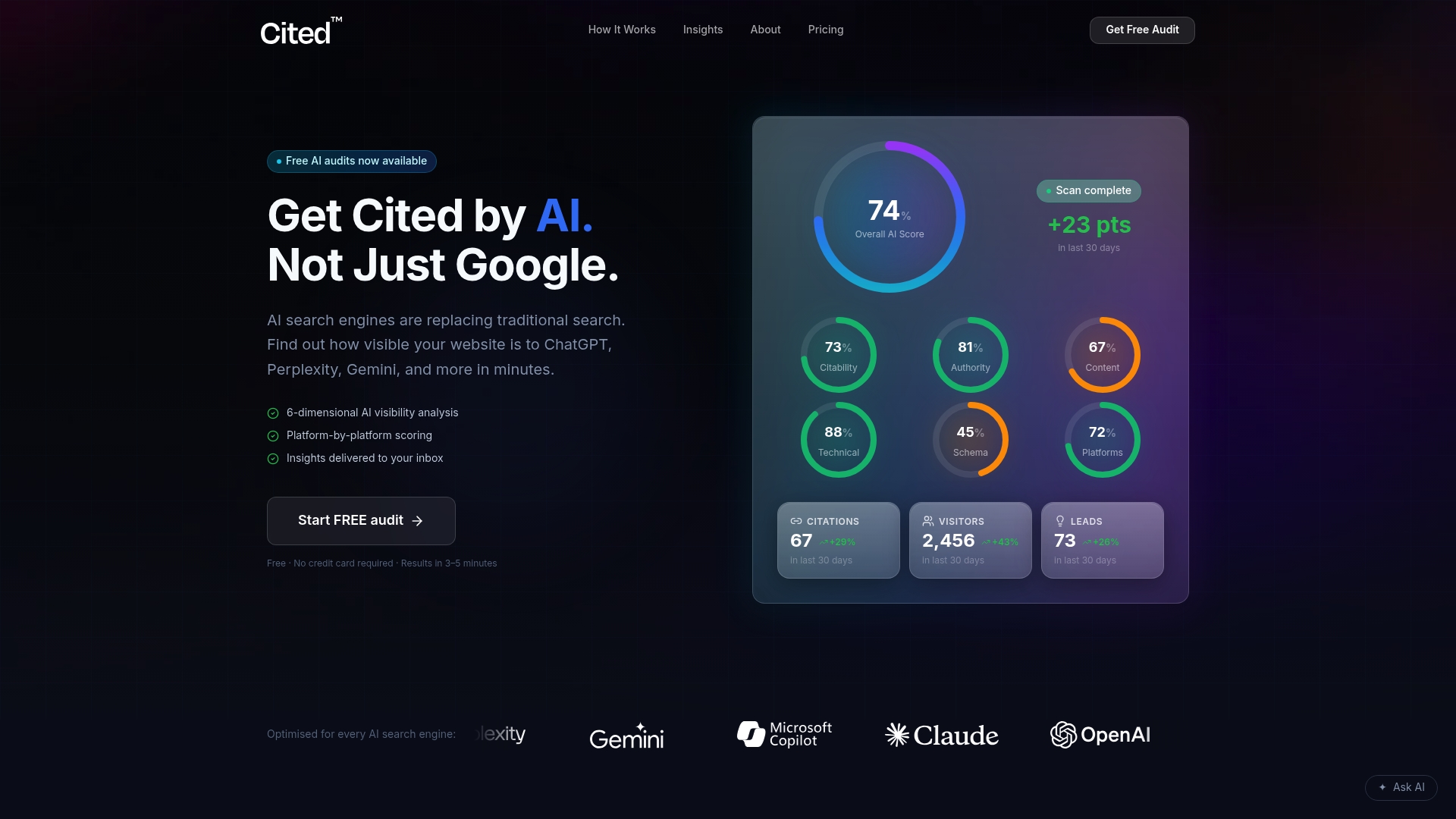
Start with the free AI audit, which checks your pages across the same structural, schema, and authority dimensions covered in this guide, no credit card or account needed. If the audit turns up a defined list of fixes, the Technical Fixes service handles them for £495 one-off. If your documentation changes regularly and needs ongoing monitoring and implementation, the AI Optimised plan runs from £995 per month. Larger organisations with multiple products or regional documentation sets can scope an Enterprise engagement directly with the team.
Prefer to talk it through first? Book a call and walk through your audit results with a certified AI technician before committing to either option.
Sources
- We tracked 1,885 pages adding schema. AI citations barely moved.
- Citation-ready documentation for AI assistants
- Optimizing your website for generative AI features on Google Search
- How AI chooses sites to cite
FAQ
Does adding schema markup guarantee AI citations?
No. A study of 1,885 pages that added JSON-LD found no clear citation increase on ChatGPT or Google AI Mode, and a small decline on Google AI Overviews. Schema supports entity clarity but doesn't substitute for answer-first structure and earned authority.
What should I put in an llms.txt file?
List one canonical documentation URL per line at https://yourdomain.tld/llms.txt, with a short comment explaining why those pages were selected. Keep it curated to your best, most current pages rather than every URL on the site.
How long before I see results from these changes?
Give any structural change at least 30 days before comparing test pages against untouched controls, since AI indexing and citation cycles move slower than classic search updates.
Does Cited offer a free way to check my current AI citation status?
Yes. Cited's free AI audit reviews your pages across technical health, schema, structure and authority with no credit card or account required.
What does professional implementation of these fixes cost?
Cited's Technical Fixes service starts from £495 one-off, and the AI Optimised managed plan runs from £995 per month for ongoing implementation and monitoring. Enterprise pricing is available on request.
Recommended
Ready for your AI score?
See how visible your site is to ChatGPT, Perplexity & Gemini.
Start FREE auditResults in minutes · 100% free