

AI systems like ChatGPT and Perplexity can only cite your pages if they can crawl, read, and index them—so technical SEO is just as critical for AI visibility as it is for Google. The three essentials are making sure robots aren't blocked, putting your key answers in plain HTML rather than JavaScript, and using canonical tags to point AI systems to one authoritative version of each page. Front-loading your direct answer in the first 30% of content matters more than you'd think, since that's where most AI citations actually come from.
Technical SEO for AI: get cited by ChatGPT and Perplexity

Yes, technical SEO still decides whether AI systems can find, read and cite your pages. If a large language model cannot crawl a page, cannot parse its HTML, or cannot tell which version of a URL is canonical, that page has no chance of appearing in a ChatGPT answer or a Perplexity citation, no matter how good the writing is.
The mechanics have shifted rather than disappeared. AI search engines run retrieval before generation, which means a page has to be indexed, extractable and structurally clear before any model will consider quoting it. Google's own guidance confirms that a page needs to be indexed and eligible for a snippet before it can appear in generative features at all, which puts classic technical hygiene right back at the centre of the work.
Three fixes matter more than the rest:
- Crawlability: robots.txt, meta robots and X-Robots-Tag headers must not be silently blocking AI fetchers.
- Extractable structure: key facts need to sit in raw HTML, in short, answer-first blocks, not buried inside JavaScript that only renders in a browser.
- Indexation eligibility: canonical tags, sitemaps and duplicate content controls need to point AI systems and Google to one authoritative version of each page.
Get those three right first. Everything else, schema, freshness signals, multi-platform presence, builds on top of them.
Key Takeaways
Technical SEO determines AI citation eligibility because indexability, extractable HTML structure and clear signals govern whether a large language model can retrieve and quote a page at all.
Point | Details |
|---|---|
Fix crawl access first | Check robots.txt, meta robots and X-Robots-Tag headers before any other AI visibility work. |
Front-load your answers | Roughly 44.2% of AI citations come from the first 30% of an article, so lead with the direct answer. |
Verify raw HTML | Content rendered only by client-side JavaScript is often invisible to AI fetchers reading raw HTML. |
Schema supports, does not gatekeep | FAQPage, Article, HowTo and BreadcrumbList schema help extraction but are not required for AI features. |
Monitor logs and Search Console | Track AI-specific bot behaviour in server logs and review the Generative AI report regularly. |
Get a prioritised audit | Cited's free audit and paid Technical Fixes or AI Optimised service map directly to this roadmap. |
Table of Contents
- Why technical SEO still shapes AI citations
- The technical SEO checklist to audit first
- Does structured data actually help AI citations?
- Is your key content visible without JavaScript?
- Do your URLs and site structure help or hurt AI visibility?
- Why do speed and Core Web Vitals matter for AI crawlers?
- What signals do AI systems use, and how do you measure AI visibility?
- How do you audit a website for AI visibility?
- How RAG and query fan-out should reorder your priorities
- What does a 90-day technical roadmap for AI visibility look like?
- How do you monitor AI crawler behaviour in your log files?
- How do you handle data privacy when optimising for AI platforms?
- How do you help AI systems understand your images and video?
- Why indexability comes first in every audit
- Get a free AI visibility audit from Cited
- Sources
- FAQ
Why technical SEO still shapes AI citations
AI search engines rely on retrieval-augmented generation, or RAG. Instead of answering purely from what a model memorised during training, the system searches an index or the live web, pulls back a handful of relevant documents, and feeds those into the model as grounding material before it writes an answer. If your page is not in that retrieved set, it cannot be cited, however well it is written.
This is where query fan-out comes in. A single user question often gets expanded into several related sub-queries behind the scenes, and a page that answers multiple fan-out variants in one place has a stronger chance of being pulled into more than one retrieval pass. A page structured as one big narrative essay, with no clear sub-answers, tends to lose out to a page broken into distinct, self-contained sections.
Roughly 44.2% of AI citations come from content in the first 30% of an article, which means front-loading your direct answer is not a stylistic preference. It is the single highest-leverage structural decision on the page.
Retrieval systems reward pages that make the answer easy to find early and easy to lift cleanly.
The technical SEO checklist to audit first
Work through this in order. Each step includes how to verify it, not just what to fix.
- Check robots.txt for accidental blocks. Run
curl https://yoursite.com/robots.txtand confirm you are not disallowing paths that hold your best answer content. High priority, low effort. - Audit meta robots and X-Robots-Tag headers. View-source your key pages and check response headers with
curl -Ifor straynoindextags left over from staging. High priority, low effort. - Confirm your XML sitemap is current and accurate. It should list only canonical, indexable URLs, and Search Console's sitemap report should show them as "Success" rather than "Couldn't fetch". Medium priority.
- Resolve canonicalisation conflicts. Check that self-referencing canonical tags match the URL actually being served, particularly across HTTP/HTTPS, www/non-www and trailing-slash variants. High priority.
- Check indexation status in Search Console. The Page Indexing report shows exactly why pages are excluded, whether that is "Duplicate without user-selected canonical" or "Crawled, currently not indexed". Medium priority.
- Test crawl budget waste. Faceted navigation, internal search results and filtered URLs can quietly consume crawl budget that should go to your answer pages. Medium priority, higher effort to fix properly.
- Verify raw HTML content matches rendered content. View-source and compare it against what a browser renders after JavaScript executes. High priority, covered in more depth below.
The consistent theme across Google's own AI optimisation guidance and independent analysis from Search Engine Land is that none of this is new. It is the same technical SEO discipline that has mattered for a decade, just with a new consumer of the output.
The most common pitfall is treating crawl budget as infinite. AI fetchers, much like Googlebot, work within time and resource limits per site. A bloated sitemap full of thin, near-duplicate URLs, or a faceted navigation setup generating thousands of parameter combinations, pulls crawl attention away from the pages you actually want cited. Trim the sitemap to what deserves attention, and block or consolidate the rest.
Does structured data actually help AI citations?
Schema markup helps AI systems parse a page faster, but it is a supporting signal, not a gatekeeper. Google states directly that structured data is useful but not required for generative AI features: the content and its HTML structure matter more than the markup wrapped around it.
That said, some schema types correlate with stronger extraction results in practice:
- FAQPage schema flags question-and-answer pairs that map neatly to conversational queries.
- Article schema, especially with
datePublishedandauthorfields, gives models a clearer signal about freshness and provenance. - HowTo schema breaks a process into discrete, extractable steps.
- BreadcrumbList schema clarifies where a page sits in your site's hierarchy, reinforcing topical context.
Validate every implementation with a JSON-LD linter and Google's Rich Results Test before you consider the job done. A malformed schema block is worse than no schema at all, since it can trigger parsing errors that undermine trust in the rest of the page.
Pro Tip: Schema earns you the most predictive value when it wraps content that is already structured well in plain HTML. Markup on top of a wall of unbroken text does far less than the same markup on a page already using headings, tables and short answer blocks.
Is your key content visible without JavaScript?
Most AI fetchers read raw HTML and do not execute client-side JavaScript, so content that only appears after a script runs risks being invisible to the very systems you want to cite you.
- View-source the page and search for your primary answer text. If it is not there in the raw markup, it is not reliably reaching AI crawlers.
- Fetch the page with a bot user agent via curl and inspect what comes back, comparing it against what a normal browser shows.
- Load the page in a non-JS browser or with scripting disabled to see the worst-case version of what a fetcher encounters.
- Switch to static generation, server-side rendering, or prerendering for any template that currently relies on client-side rendering for core content.
- Re-check with the same three tests after deploying the fix, confirming the answer text now appears in the raw response.
Testing with non-JavaScript fetches removes a common class of visibility failure that many site owners never think to check, because the page looks perfectly fine in Chrome.
Do your URLs and site structure help or hurt AI visibility?
Clean architecture and consistent canonicalisation tell AI systems which page is the authoritative source, and messy versions actively work against you by splitting authority across near-duplicates.
- Use short, descriptive, lowercase URLs without unnecessary parameters or session IDs.
- Set self-referencing canonical tags on every indexable page, and point canonicals from parameter variants back to the clean version.
- For faceted navigation, noindex low-value filter combinations, canonicalise near-duplicates back to the parent category, and restrict crawlable parameter combinations through your CMS or robots rules rather than relying on guesswork.
- Run a quick crawl with a site auditor and filter for duplicate title tags: that is usually the fastest way to spot canonicalisation problems at scale.
Pro Tip: Internal links do more than pass authority; they help a single page cover more query fan-out variants. Link your answer page from every related page that shares a sub-topic, and use descriptive anchor text rather than "click here" so the connection between topics is explicit. Good internal linking practice also shortens the crawl path to your most important content.
Why do speed and Core Web Vitals matter for AI crawlers?
AI fetchers, like traditional crawlers, work within a time budget per request, and a slow or oversized page can simply time out before it is ever read.
Watch these metrics specifically:
- Time to first byte, since a slow server response can cause a fetcher to abandon the request entirely.
- Largest Contentful Paint and total page weight, which correlate with how long a fetcher has to wait for meaningful content.
- Response size, since bloated HTML pages cost more to parse and transmit.
Use PageSpeed Insights or Search Console's Core Web Vitals report to find the worst offenders. Quick wins: compress images, minify and defer non-critical JavaScript bundles, and enable server-side caching so repeat fetches resolve faster.
What signals do AI systems use, and how do you measure AI visibility?
Beyond crawlability, AI systems weigh a handful of trust and clarity signals when deciding what to cite:
- Brand authority, built through consistent mentions and backlinks across the web.
- Content freshness, particularly a visible, accurate
datePublishedand update history. - Multi-platform presence, since being referenced consistently across several sites reinforces credibility.
- Structural clarity, meaning clear headings, short answer blocks and logical hierarchy.
Independent analysis of ChatGPT's retrieval stack finds brand authority and structural clarity carry real weight in citation likelihood, alongside schema as a smaller additional lift.
To measure this yourself, check the Generative AI report inside Google Search Console, which shows impressions and clicks specifically from AI-driven search surfaces. Cross-reference that with your raw server logs, filtering for known AI user agents, and consider a dedicated AI visibility tracking approach to see which pages are actually being fetched and how often.
How do you audit a website for AI visibility?
Run the audit in this sequence, not at random:
- Verify crawl access with robots.txt and Search Console's URL Inspection tool.
- Check raw HTML against rendered HTML for every key template.
- Validate schema with a JSON-LD linter and the Rich Results Test.
- Run extraction tests by asking ChatGPT, Perplexity and Gemini direct questions your content answers, and note whether your page appears.
For tooling, Search Console covers indexation and fetch errors, Semrush offers technical audit crawls at scale, and Cloudflare logs can reveal which AI bots are actually hitting your server. A technical tooling partner such as Gleanit can help automate parts of this sequence for larger sites.
If this sequence feels like a lot to run manually across dozens of pages, a free AI audit from Cited covers the same ground and flags exactly where your site is losing citation eligibility.
How RAG and query fan-out should reorder your priorities
RAG retrieval and query fan-out together explain why some fixes deserve attention before others. A page that is not indexed cannot be retrieved. A page that is retrieved but poorly structured is harder to extract cleanly, even when it holds the right answer.
That gives a clear order of operations, backed by the Crawlable → Structured → Citable → Tracked loop: fix indexation and extractability first, since nothing else matters if the page fails at that stage. Address freshness and corroborating detail next, since AI systems weigh how current and well-supported an answer looks. Layer schema and secondary signals on top last, as the smaller lift they genuinely are.
- Fix crawl and indexation issues before touching schema.
- Rewrite your top pages into answer-first blocks before chasing new backlinks.
What does a 90-day technical roadmap for AI visibility look like?
- Month 1: foundations. Fix robots.txt, meta robots, canonicalisation and sitemap hygiene. Verify raw HTML matches rendered content on your top 20 pages. Check Search Console's Generative AI report for a baseline.
- Month 2: structure and speed. Rewrite key pages into answer-first, question-headed sections. Fix Core Web Vitals issues flagged in month one. Implement or repair FAQPage and Article schema.
- Month 3: signals and verification. Strengthen internal linking across fan-out topics. Re-run extraction tests against ChatGPT, Perplexity and Gemini. Compare Search Console and log data against your month-one baseline to confirm movement.
Check progress at the end of each month against the baseline, not just against the checklist, since the goal is measurable citation movement, not a completed to-do list.
How do you monitor AI crawler behaviour in your log files?
Traditional log analysis focused on Googlebot and Bingbot. AI crawler behaviour needs its own tracking, because engines like ChatGPT, Claude and Perplexity run distinct index bots and separate live-fetch bots, and they do not always behave like a conventional search crawler.

Pull raw server logs, ideally through Cloudflare's logging tools if you already sit behind that network, and filter for known AI user agent strings. Look for three things specifically. First, frequency: how often each AI bot visits, and whether that frequency tracks with content updates or ignores them. Second, response codes: a high rate of 4xx or 5xx responses to AI bots often points to blocked paths or server errors that never show up in a human browsing session. Third, path coverage: which sections of the site AI bots actually reach, versus which sections they consistently skip.
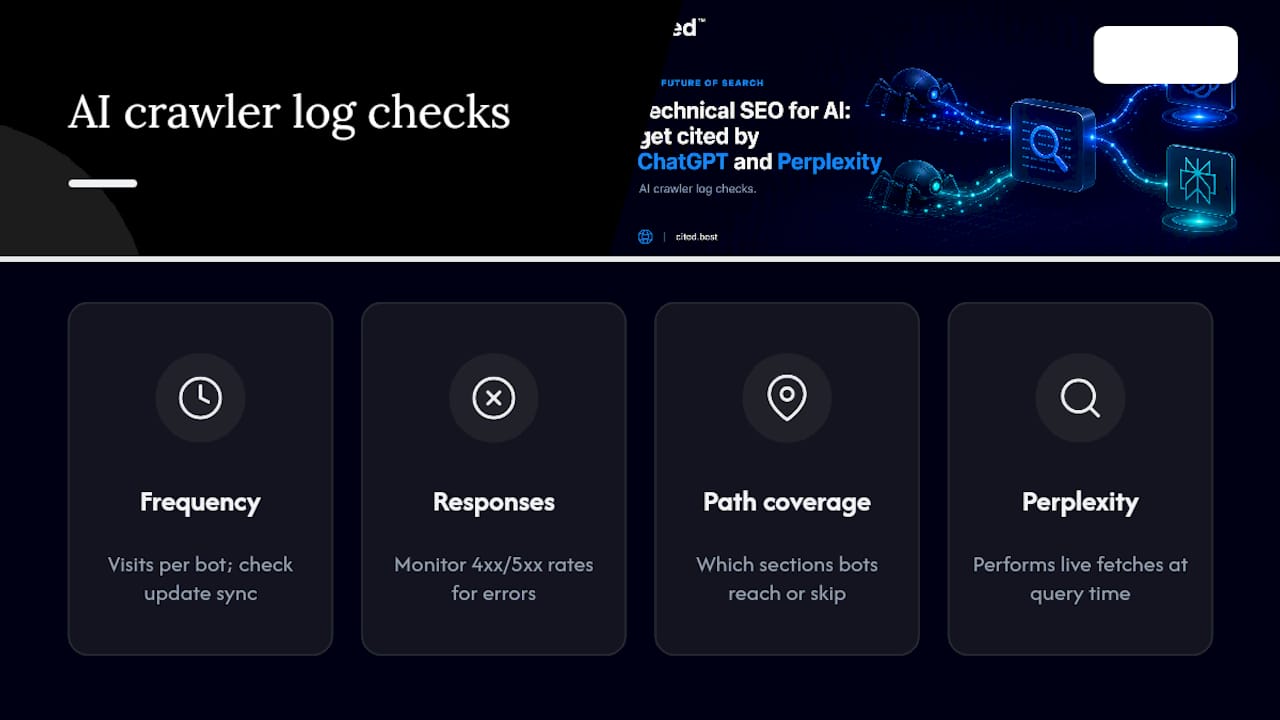
Perplexity in particular is worth watching closely, since it often performs live fetches at query time rather than relying purely on a pre-built index, which makes its log entries a useful real-time debugging signal. If Perplexity's fetcher hits a page and gets a slow response or a server error, that failure is happening in the moment a user is asking a question, not in some batch crawl days earlier.
Set a recurring log review, weekly for high-traffic sites, monthly for smaller ones, rather than treating it as a one-off audit task. Crawler behaviour shifts as engines update their retrieval infrastructure, and a pattern that looked healthy three months ago can quietly break.
How do you handle data privacy when optimising for AI platforms?
Making your content easier for AI systems to fetch and cite does not mean loosening how you handle user data, and the two goals do not conflict as much as site owners sometimes assume.
Keep personal data out of the pages you want indexed and cited. Account pages, order histories and any content behind a login should stay blocked from crawling through robots.txt or authentication, regardless of how AI-friendly the rest of the site is. That separation matters more, not less, as more surfaces attempt to fetch and summarise your content.
Review your robots.txt and any explicit AI bot rules for consistency with your actual privacy obligations. If you operate under UK data protection law, blocking AI crawlers from pages containing personal data is a straightforward technical step, and it sits alongside your existing GDPR compliance work rather than replacing it.
Be deliberate about what you allow AI systems to train on versus what you allow them to retrieve and cite live. Some site owners choose to block AI training crawlers while still allowing live-fetch bots used for real-time search citation, since those serve different purposes: one builds a model, the other answers a specific user query in the moment. Check each engine's documented user agents before deciding, since blocking the wrong one can remove you from citation eligibility rather than protecting anything.
Finally, keep a record of which bots you have explicitly allowed or blocked and why. As AI platforms multiply, that record becomes the reference point when you need to explain a sudden change in AI-driven traffic or citations.
How do you help AI systems understand your images and video?
AI systems cannot see an image the way a human does. They rely on the text signals around it, alt text, file names, captions and structured metadata, to understand what the image or video shows and whether it is worth citing as supporting evidence.
Write alt text that describes the actual content and its relevance to the page, not a keyword-stuffed label. "Chart showing UK AI search adoption by sector, 2026" tells a model far more than "chart image 3". Do the same with file names: rename IMG_4021.jpg to something descriptive before it goes live, since some fetchers use the file name as a fallback signal when alt text is missing or thin.
For video, provide a text transcript or detailed caption file alongside the embed. Video content is currently harder for most AI systems to parse directly than text, so a transcript effectively translates your video into a format that retrieval systems can index and quote from. The same applies to infographics: if the key data in an infographic does not also exist as text somewhere on the page, that data is functionally invisible to an AI system, however clear it looks to a human reader.
Use ImageObject and VideoObject schema where relevant, including caption and description fields, and keep captions visible in the page's HTML rather than only inside the image file itself. A short caption line under a chart, stating the key figure in plain text, often does more for AI extraction than the chart itself.
Why indexability comes first in every audit
I audit indexability and extractability before anything else, because a page that cannot be crawled has zero chance of being cited, regardless of how strong the writing is. Sites that jump straight to schema or backlinks while ignoring a blocked robots.txt rule are optimising the wrong end of the funnel. Fix the foundation first.
Get a free AI visibility audit from Cited
Cited gives you a clear, prioritised view of exactly where your site is losing AI citations, rather than a generic score with no path to fixing it. The free AI audit checks the same crawlability, structure, schema and signal issues covered throughout this article, and hands you a report ranked by impact, not by what happens to be easiest to explain.
From there, you choose the level of support that fits. Technical Fixes at £495 one-off covers the foundational repairs, crawl rules, canonicalisation, rendering issues, that most sites need first. AI Optimised at £995 a month keeps that work going, tracking your citation performance against Cited's own methodology as engines update how they retrieve and rank content. Larger or multi-site organisations can discuss an Enterprise package built around their specific stack.
Start with the audit. It costs nothing, and it tells you precisely which of the fixes in this article matter most for your site right now.
Sources
- How Do Technical SEO Factors Impact AI Search? Study, SEMrush
- LLM SEO: The complete guide to ranking in AI answers, CrawlRaven
- Optimize for AI crawlers, Search Engine Land
FAQ
How is AI being used in technical SEO?
AI-driven search engines use retrieval-augmented generation to pull indexed, well-structured pages into their answers, which means the same crawlability, HTML clarity and canonicalisation work that underpins traditional SEO now directly determines AI citation eligibility.
Is there an SEO discipline specific to AI search?
Yes, often called AI SEO or generative engine optimisation: it applies classic technical SEO fundamentals alongside AI-specific tactics such as answer-first content structure, per-engine bot allowlisting and monitoring the Generative AI report in Search Console.
How do you do SEO for AI search specifically?
Start by confirming AI bots can crawl and index your pages, structure key content in short, extractable answer blocks near the top of the page, validate schema where relevant, and check server logs for AI-specific fetch patterns.
Can ChatGPT do SEO work for you?
ChatGPT can help draft content and explain concepts, but it cannot audit your live crawl access, fix rendering issues, or verify indexation status, which is why a technical audit through tools like Search Console or a service such as Cited remains necessary.
What should I fix first for AI visibility?
Crawlability and extractable HTML structure come before everything else, since a page that fails indexation has no chance of being retrieved or cited, regardless of how strong its schema or backlinks are.
Recommended
Ready for your AI score?
See how visible your site is to ChatGPT, Perplexity & Gemini.
Start FREE auditResults in minutes · 100% free