
Author schema must use nested Person or Organization objects with both a name and URL—never plain text strings. Each author should be listed separately in an array, and the author entity must stay distinct from the publisher to maintain proper attribution. Before publishing, validate your markup in Google's Rich Results Test and Search Console to catch common errors like missing URLs or mismatched bylines.
Three Step Author Schema Audit for SEOs & Devs, Clear Five Red Flags
Model the author as a nested Person or Organization entity with author.name and author.url, never as a plain string. Follow Google's author markup guidance: give every byline a canonical URL or sameAs link, keep the visible byline identical to the markup, then confirm it all passes in Search Console before you move on.
***
TL;DR: >- Using nestedPersonorOrganizationobjects in author schema is essential because plain string models prevent disambiguation and can lead to validation errors.- When multiple authors are involved, each must be listed as separate objects within an array, not combined into a single string.- Avoid conflating the publisher and author, as mixing these entities weakens attribution and makes entity resolution more difficult.- Correct schema requiresauthor.nameandauthor.url, with the latter linking to a verifiable profile, and all author info should match the visible byline.- Validate author markup with Google's Rich Results Test and Search Console, and fix common issues like string authors, missing URLs, and mismatched bylines before publishing.
***
Table of Contents
- What is author schema and where should you use it?
- Person or Organization: which one, and what happens if you get it wrong?
- What does correct JSON‑LD look like, and what commonly breaks it?
- What does Google actually want, and where do sites go wrong?
- How do you validate author markup before it goes live?
- Why does author schema matter for E‑E‑A‑T and AI citations?
- Implementation checklist for technical teams
- Sources
- FAQ
What is author schema and where should you use it?
The author property identifies the person or organisation responsible for a piece of content. Schema as a field used chiefly within CreativeWork and Rating types, which covers most editorial content on the web.
You'll meet author schema most often on:
Articleand its subtypes,NewsArticleandBlogPostingRating, where the reviewer's identity matters for trust- Any
CreativeWorkvariant where a named contributor produced the material
Author markup belongs on content that has a genuine, attributable creator. A product listing page doesn't need it. A press release with no named writer probably shouldn't force one either. But any article-shaped page, whether it's a blog post, a news piece, or a long-form guide, is exactly where this property earns its place. Skip it on pages where authorship is genuinely anonymous or institutional with no named contributor, rather than inventing a byline to satisfy a schema checklist.
Person or Organization: which one, and what happens if you get it wrong?
Pick Person for named bylines and Organization for corporate or editorial-board authorship. Google's structured data guidance is direct on this: individual writers should be marked up as Person, and Organization is reserved for cases where the company itself is genuinely the author, not merely the publisher of someone else's work.
The decision plays out in three steps:
- Check the byline. If a named individual wrote it, use
Person. If the piece carries no named writer and represents the outlet's collective voice, useOrganization. - Handle multiple writers with an array. List every author shown on the page as separate objects inside an
authorarray, rather than cramming two names into one string. - Keep publisher and author distinct, even when they're the same brand. Conflating the two collapses two separate entities into one, which weakens attribution and makes entity resolution harder for anything trying to work out who actually wrote what.
Pro Tip: If your CMS auto-populates "Author" with your company name by default, audit it. That single default setting is one of the most common ways sites accidentally turn every article into an Organization-authored piece, even when a named journalist wrote it.
What does correct JSON‑LD look like, and what commonly breaks it?
A single named author needs a nested Person object, not a text field. Here's the minimal correct pattern:
```json
{
"@type": "Article",
"author": {
"@type": "Person",
"name": "Jane Doe",
"url": "https://example.com/authors/jane-doe"
}
}
```
Multiple contributors take an array of the same object shape:
```json
{
"author": [
{ "@type": "Person", "name": "Jane Doe", "url": "https://example.com/authors/jane-doe" },
{ "@type": "Person", "name": "Sam Lee", "url": "https://example.com/authors/sam-lee" }
]
}
```
Corporate authorship swaps the type:
```json
{
"author": {
"@type": "Organization",
"name": "Example News Desk",
"url": "https://example.com/about"
}
}
```
Schema.org's Article specification confirms these nested patterns as the standard structure across Article, NewsArticle, and BlogPosting.
Two invalid patterns show up constantly in audits:
Pattern | Why it fails |
|---|---|
| Plain strings prevent disambiguation; there's no |
| Stuffing publisher text into |
Both mistakes still validate as syntactically correct JSON, which is exactly why they slip through so often unnoticed.
What does Google actually want, and where do sites go wrong?
author.name should contain only the author's name, nothing else, with author.url or sameAs doing the disambiguation work. Google recommends pairing this with datePublished, an image, and a publisher object that includes a logo, since those fields are treated as effectively mandatory for rich result eligibility even though the spec lists them as recommended rather than required.
The recurring errors worth checking first:
- Author modelled as a plain string instead of a nested
PersonorOrganization - Visible on-page byline not matching the name inside the markup
- Missing
publisher.logo, which quietly disqualifies a page from certain rich listings - Headlines in the markup running long enough to get truncated or flagged
A practitioner guide covering common Article schema mistakes notes that a small cluster of slips, string authors, missing author.url, and mismatched bylines, accounts for the bulk of the author-related warnings editorial sites see in Search Console. Fix those four and you'll clear most of the noise.
How do you validate author markup before it goes live?
Run your JSON‑LD through Google's Rich Results Test first; it flags missing fields and structural errors in seconds. From there:
- Check Search Console's Enhancements report for
Articlewarnings tied to missing or malformed author fields, then cross-reference the affected URLs. - Compare the visible byline against the markup line by line. Xmlschemata's guide treats this mismatch as a policy-level issue, not a cosmetic one, and it's flagged as such in coverage reports.
- Fix, then request indexing for the corrected URL rather than waiting for the next natural crawl.
Pro Tip: Don't validate one article and assume the template is fixed sitewide. CMS templates often apply author logic inconsistently across post types, so spot-check a news post, a blog post, and a guest-authored piece separately.
Why does author schema matter for E‑E‑A‑T and AI citations?
Nested Person objects with url and sameAs give search engines and AI models something a plain string never can: a resolvable entity. That resolvability is what supports knowledge panels and lets a model connect a byline to a real, verifiable person rather than a name floating with no anchor.
Treat Google's recommended fields, author, image, datePublished, publisher.logo, as mandatory in practice, not optional extras you'll get to eventually. The sites that invest in this tend to focus on three things:
- Dedicated author profile pages with consistent, canonical URLs
sameAslinks pointing to the same social and professional profiles every time, never varying the URL from page to page- Clean separation between author and publisher entities, which Google's own guidance ties directly to stronger attribution signals
If you want a deeper walkthrough of how this connects to broader structured data strategy, Cited's guide to article schema for site owners covers the implementation side in more detail, and the analysis on whether schema markup actually gets you cited by AI search is worth reading if AI visibility is the goal driving this work.
Implementation checklist for technical teams
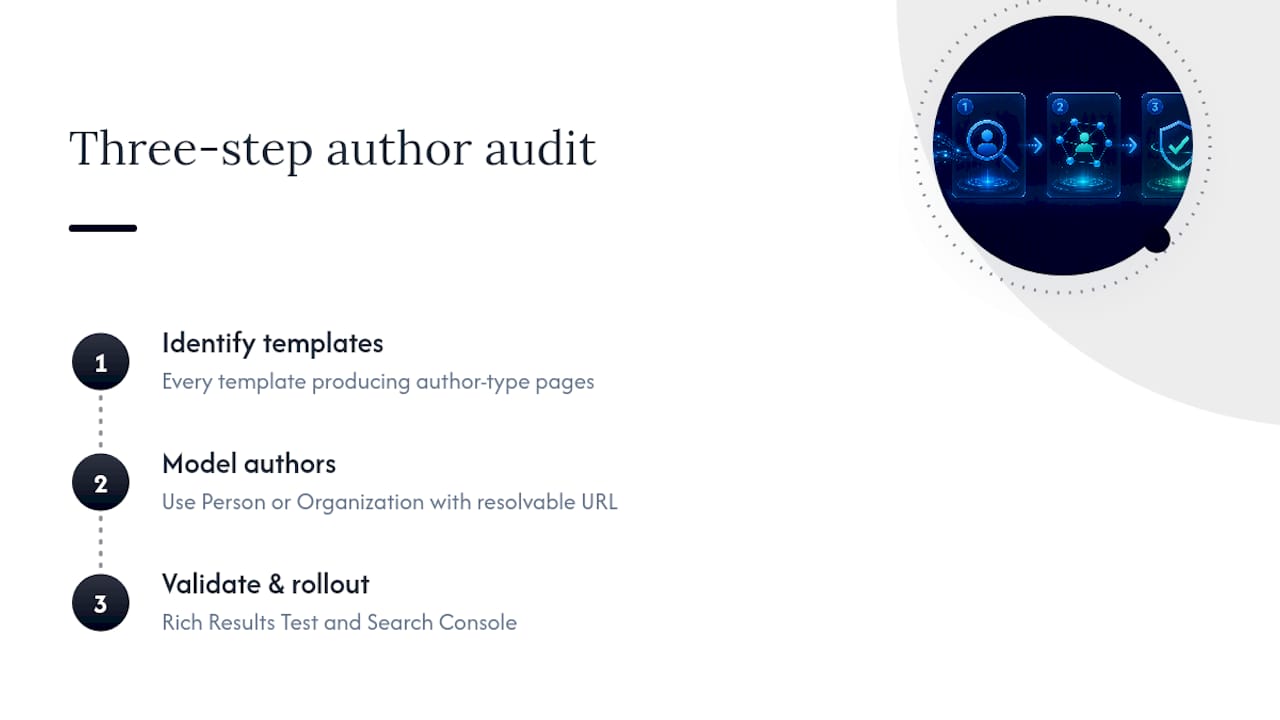
Run this as a three-step audit: identify every template producing Article-type pages, model each author correctly as Person or Organization with a resolvable URL, then validate with Rich Results Test and Search Console before rolling out sitewide.
The five red flags worth triaging first in any audit: string authors, missing author.url, byline mismatches, absent publisher.logo, and multi-author pages still using a single object instead of an array. Fixing these five clears most of the warnings you'll encounter.
For teams handling more complex platforms, Parent Technology's notes on store-view scoped Magento schema markup are a useful reference for the CMS-specific pitfalls that generic guides tend to skip. Cited's review schema implementation guide also demonstrates the same nested-entity pattern applied to a different type, which is handy if you're rolling this logic out across templates rather than a single page.
If your author markup has never been audited, Cited's free AI visibility audit at cited.best/audit checks this alongside the other structural signals that affect whether AI search engines cite you at all.
Sources
Start with Schema.org's author property and Google's Article structured data guide for canonical rules. SchemaStats offers useful supplementary data on real-world usage patterns, and Google's Rich Results Test remains the fastest way to validate before publishing.
- Schema
- Article (Article, NewsArticle, BlogPosting) structured data | Google Search Central
- Article schema: JSON‑LD markup guide with examples
FAQ
What are the four types of schema?
Schema.org organises data into types covering things, creative works, events, and organisations, but for author markup specifically, the two you need are Person and Organization, nested inside a host type like Article.
Who is the author of schema theory?
Schema.org, the vocabulary this article covers, was launched jointly by Google, Microsoft, Yahoo, and Yandex in 2011. Cognitive schema theory, a separate concept from psychology, has no single credited author and isn't the subject of this markup standard.
What is a blog schema?
Blog schema typically means BlogPosting, a subtype of Article in the Schema.org vocabulary, used to mark up individual blog entries with the same author, publisher, and date fields as a news article.
What is schema on write?
"Schema on write" is a database design term describing when data structure is enforced before storage, distinct from structured data markup like author schema, which is applied to published web content rather than database records.
Does author schema string modelling ever work?
No. A plain string in author.name prevents the disambiguation that author.url or sameAs provides, which is why Google's guidance and Schema.org both specify a nested Person or Organization object instead.
Recommended
Ready for your AI score?
See how visible your site is to ChatGPT, Perplexity & Gemini.
Start FREE auditResults in minutes · 100% free