
If you want your content cited in ChatGPT Search, you need to allow OAI-SearchBot, but blocking it won't stop OpenAI from using GPTBot to train its models—these are two completely separate systems. To prevent your content from being used in AI training, you must specifically block GPTBot in your robots.txt file, and verify requests by checking IP ranges rather than just trusting user-agent strings, which can be spoofed. API access is entirely separate and requires an API key from the OpenAI dashboard, not robots.txt configuration.
Developers' Checklist for OpenAI Bot Access: robots.txt, IPs, llms.txt
Allow OAI-SearchBot if you want your pages cited in ChatGPT Search, and treat GPTBot separately if you want to opt out of AI training data collection. These are two different jobs, and blocking one has no effect on the other. API access is a third, entirely separate channel: it needs a key generated in the OpenAI dashboard, not a robots.txt entry, and it has nothing to do with crawler permissions at all.
***
TL;DR: >- Blocking GPTBot does not prevent OpenAI from using OAI-SearchBot for citations, as they are independent systems with separate configuration rules.- To prevent your content from being used in training data, you must specifically block GPTBot, but it will not affect real-time search citation in ChatGPT.- Correctly configuring robots.txt with exact user-agent tokens is essential, as generic blocks or misplacement can accidentally allow or block undesired traffic.- Verifying requests requires IP range checks against AI's published IP lists, not just user-agent strings, since the latter are easily spoofed.- Site security layers like CDNs and firewalls often override robots.txt, so check those settings if blocking rules seem ignored.
***
Table of Contents
- OpenAI bot access checklist: quick actions for developers and site owners
- What are GPTBot, OAI-SearchBot and ChatGPT-User?
- How do you allow or block OpenAI crawlers in robots.txt?
- How do you verify OpenAI crawler activity and spot spoofed requests?
- How does OpenAI API access differ from crawler access?
- Why do robots.txt rules sometimes get ignored anyway?
- What is llms.txt and how does it help AI citation?
- What does a proper OpenAI bot audit actually check?
- Should you prioritise AI visibility or training opt-out?
- Get a free AI visibility audit from Cited
- Where to verify this yourself
- Sources
- FAQ
OpenAI bot access checklist: quick actions for developers and site owners
Before anything else, decide what you actually want. Do you want your content surfaced in AI answers, or do you want to keep it out of model training data? That single decision drives every setting below.
- Set your goal first: visibility in AI search results usually means allowing OAI-SearchBot; opting out of training means blocking GPTBot specifically.
- Update robots.txt with exact user-agent tokens rather than a blanket rule that catches everything.
- Check your CDN and firewall, because bot-management rules often override robots.txt before it's even read.
- Create and secure API keys separately if you're building anything that calls the OpenAI API programmatically.
- Verify with logs and IP ranges rather than trusting user-agent strings alone, since those are easy to fake.
Get these five steps right and you've covered the vast majority of what site operators get wrong when they first try to manage OpenAI bot access.
What are GPTBot, OAI-SearchBot and ChatGPT-User?
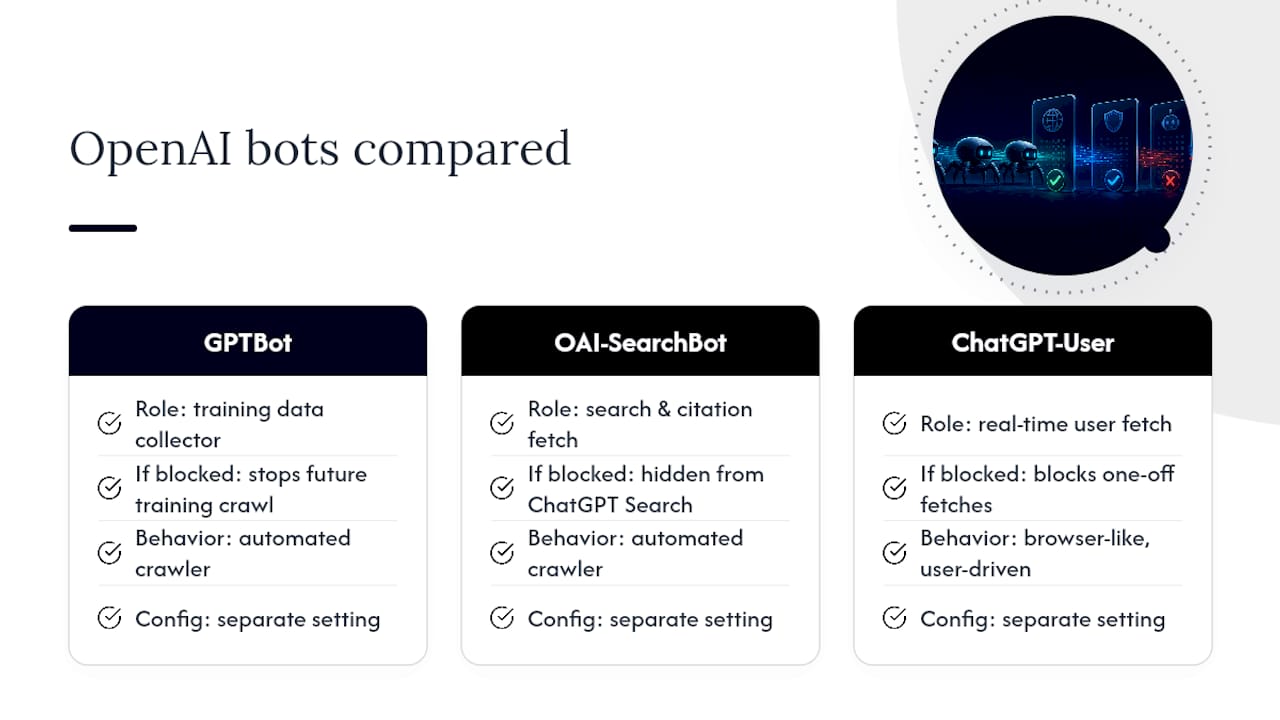
OpenAI runs three distinct bots, and each does a different job. Treating them as one thing is the most common mistake we see in technical audits.
GPTBot collects data used to train future models. If your priority is keeping your content out of training sets, this is the one you block.
OAI-SearchBot retrieves content for live search and citation inside ChatGPT Search. Block this one and you're likely invisible in that surface, regardless of how good your content is.
ChatGPT-User fires when a person asks ChatGPT to fetch something in real time, a one-off request rather than automated crawling. It behaves more like a browser acting on a user's instruction, and many site owners choose different rules for it than for the two automated crawlers.
According to OpenAI's own bot documentation, these are independent, separately configurable systems, and you must set rules for each user-agent on its own. Turning off GPTBot does nothing to OAI-SearchBot's access, and vice versa. This independence is the single most misunderstood part of managing OpenAI bot access, and it's the reason so many robots.txt files end up either accidentally blocking citation traffic or accidentally leaving training crawlers wide open.
Pro Tip: If your only goal is training opt-out, blocking GPTBot doesn't erase what earlier crawls already fed into existing models. It only stops future collection.
How do you allow or block OpenAI crawlers in robots.txt?
You control each crawler with its exact user-agent token in robots.txt, and specific rules always beat wildcard ones. Get the token wrong, add a stray space, or rely on a generic Disallow: / block, and you'll either block traffic you wanted or allow traffic you meant to stop.
Guides on crawler configuration consistently recommend explicit, named blocks over blanket rules, because specific user-agent rules override broader Disallow statements elsewhere in the file.
Place these blocks above any generic User-agent: * section, since order and specificity both matter to how crawlers interpret conflicting rules. One thing to keep in mind: changes to robots.txt don't take effect instantly. Search systems typically need roughly 24 hours to notice and adapt to updated rules, so don't assume a fix has failed just because you still see old behaviour an hour after publishing.
How do you verify OpenAI crawler activity and spot spoofed requests?
Check the requesting IP against OpenAI's published ranges, because user-agent strings alone prove nothing. Anyone can send a request claiming to be GPTBot; only the IP tells you whether it's genuine.
OpenAI publishes machine-readable IP range files specifically so operators can validate incoming traffic rather than trust a header that's trivial to fake.
- Pull recent hits with
grep -E 'GPTBot|OAI-SearchBot' /var/log/nginx/access.log(or the Apache equivalent) to see what's actually been requesting your pages. - Cross-check each IP against the current JSON range file rather than assuming last month's list still applies.
- Look for the
robots.txtmarker OpenAI appends when fetching that file specifically, which stops you miscounting a robots.txt check as a full content crawl in your log analysis. - If you see access from an IP outside the published ranges, treat it as unverified traffic and investigate separately.
If you've blocked a crawler in robots.txt but keep seeing what looks like its traffic, that's usually a real user triggering ChatGPT-User through a live request, not a violation of your Disallow rule. It's worth reading through how to make sure AI bots can access your website if you want a fuller walkthrough of this verification process.
Pro Tip: Set up a weekly cron job that grips your logs and flags any OpenAI user-agent string with an IP outside the published range. Catching spoofed traffic early beats discovering it in a security review months later.
How does OpenAI API access differ from crawler access?
API access is a completely separate system from crawler permissions, and confusing the two wastes time troubleshooting the wrong thing. Robots.txt controls what crawlers can read from your public site. The API is how your own applications send requests to OpenAI's models, and it requires a key, not a user-agent rule.
You generate API keys inside the OpenAI dashboard and authenticate every request with an Authorization: Bearer $OPENAI_API_KEY header. Official SDKs for Python, Node.js and C# handle most of this for you, and all of them expect the key to sit in an environment variable rather than hardcoded in your source.
- Never expose an API key in client-side JavaScript or a public repository, since anyone who finds it can bill your account.
- Use server-side secret management (environment variables, a secrets manager, or your cloud provider's equivalent) rather than pasting keys into config files.
- For serverless or cloud-native setups, look at workload identity federation, which issues short-lived tokens instead of a long-lived key sitting in storage.
- A first call typically looks like a simple POST to the Responses API with your bearer token in the header, model name, and input text in the body.
Why do robots.txt rules sometimes get ignored anyway?
CDN and firewall rules frequently intercept bots before robots.txt is ever consulted, which is why "correct" robots.txt files still fail to produce the expected result. If your site sits behind a security layer, that layer's own bot-management settings usually take priority.
- Check your CDN or WAF dashboard for bot-management rules that might be silently blocking GPTBot or OAI-SearchBot regardless of what robots.txt says.
- Fetch your own robots.txt from an external tool or a different network to confirm it looks the way you expect from outside your infrastructure.
- Remember that OpenAI's crawlers don't honour a Crawl-delay directive, so apply rate limiting at the server level if request volume becomes a concern.
- Check that your sitemap and any llms.txt file aren't sending conflicting signals about which pages should be crawled.
Pro Tip: If GPTBot appears in your logs despite a Disallow rule, check your security plugin or WAF settings first. Most silent blocks originate there, not in a misconfigured robots.txt file.
What is llms.txt and how does it help AI citation?
llms.txt gives AI systems a curated summary of your site's structure and preferred pages, complementing rather than replacing robots.txt. Where robots.txt is a permission system, llms.txt is closer to a signpost, pointing crawlers towards the pages you'd most like cited.
- Use it to list canonical organisation details and the specific pages you consider authoritative on a topic.
- Pair it with schema.org structured data, which helps AI systems extract facts accurately rather than guessing from unstructured text.
- Together, these signals improve the odds that a model cites the right page rather than an outdated or thin one.
For a fuller breakdown of setup and syntax, see what llms.txt is and how it works, and for the wider technical picture, technical SEO for AI citation covers how these pieces fit together.
What does a proper OpenAI bot audit actually check?
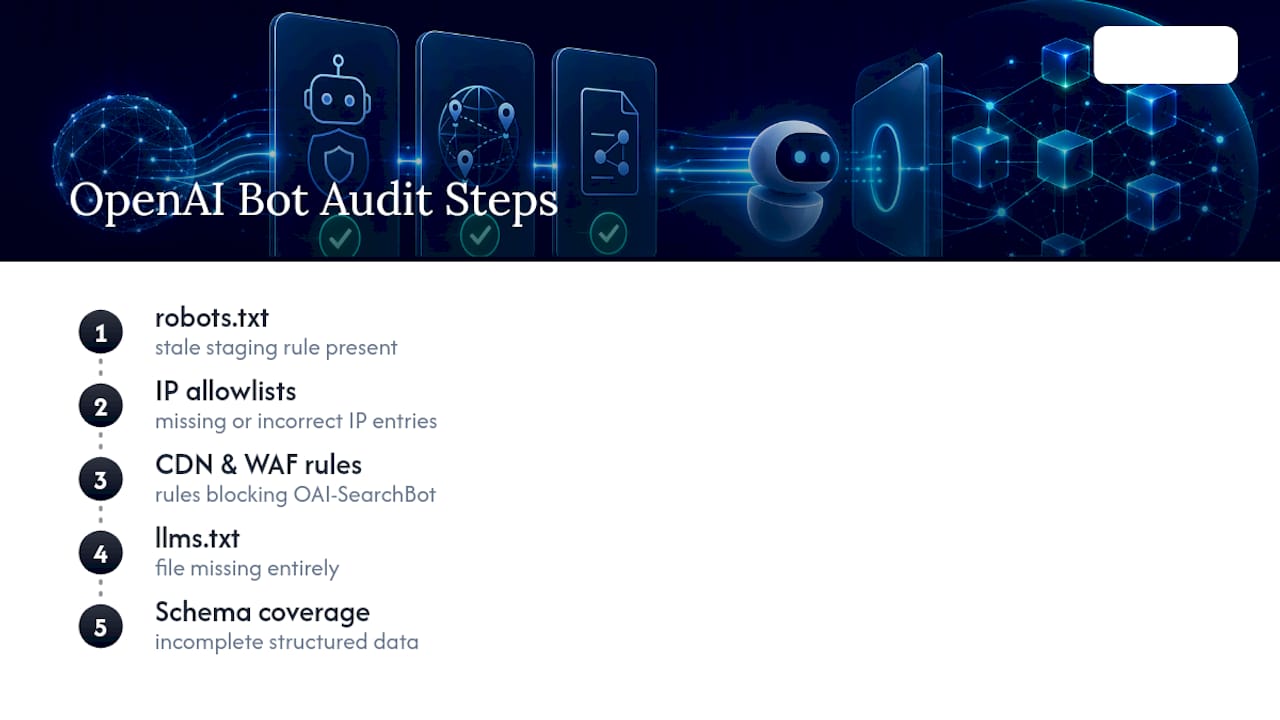
A proper audit starts with robots.txt, then moves to IP allowlists, CDN and WAF bot rules, and finally llms.txt and schema coverage. In practice, the most common issues Cited finds are a stray Disallow: / left over from a staging environment, a CDN bot-management rule silently blocking OAI-SearchBot, and no llms.txt file at all. Small errors, outsized effect on visibility.
Should you prioritise AI visibility or training opt-out?
The honest trade-off is this: blocking GPTBot protects your content from future training runs, but it does nothing for citation visibility, and blocking OAI-SearchBot too means disappearing from ChatGPT Search entirely. For most public content that already lives on the open web, I'd default to allowing OAI-SearchBot and deciding on GPTBot separately based on licensing concerns rather than fear. If you're unsure which setting fits your business, get a proper audit rather than guessing from a forum thread.
— Tom Heaton
Get a free AI visibility audit from Cited
Cited is the practical route to sorting out OpenAI bot access without spending a weekend cross-referencing IP ranges and robots.txt syntax yourself. Unlike piecing together fixes from scattered guides, a free audit checks your robots.txt, IP allowlisting, CDN and firewall bot rules, llms.txt presence and schema markup in one pass, across the six dimensions that determine whether AI search engines like ChatGPT, Perplexity, Gemini, Claude and Copilot can find and cite you at all.
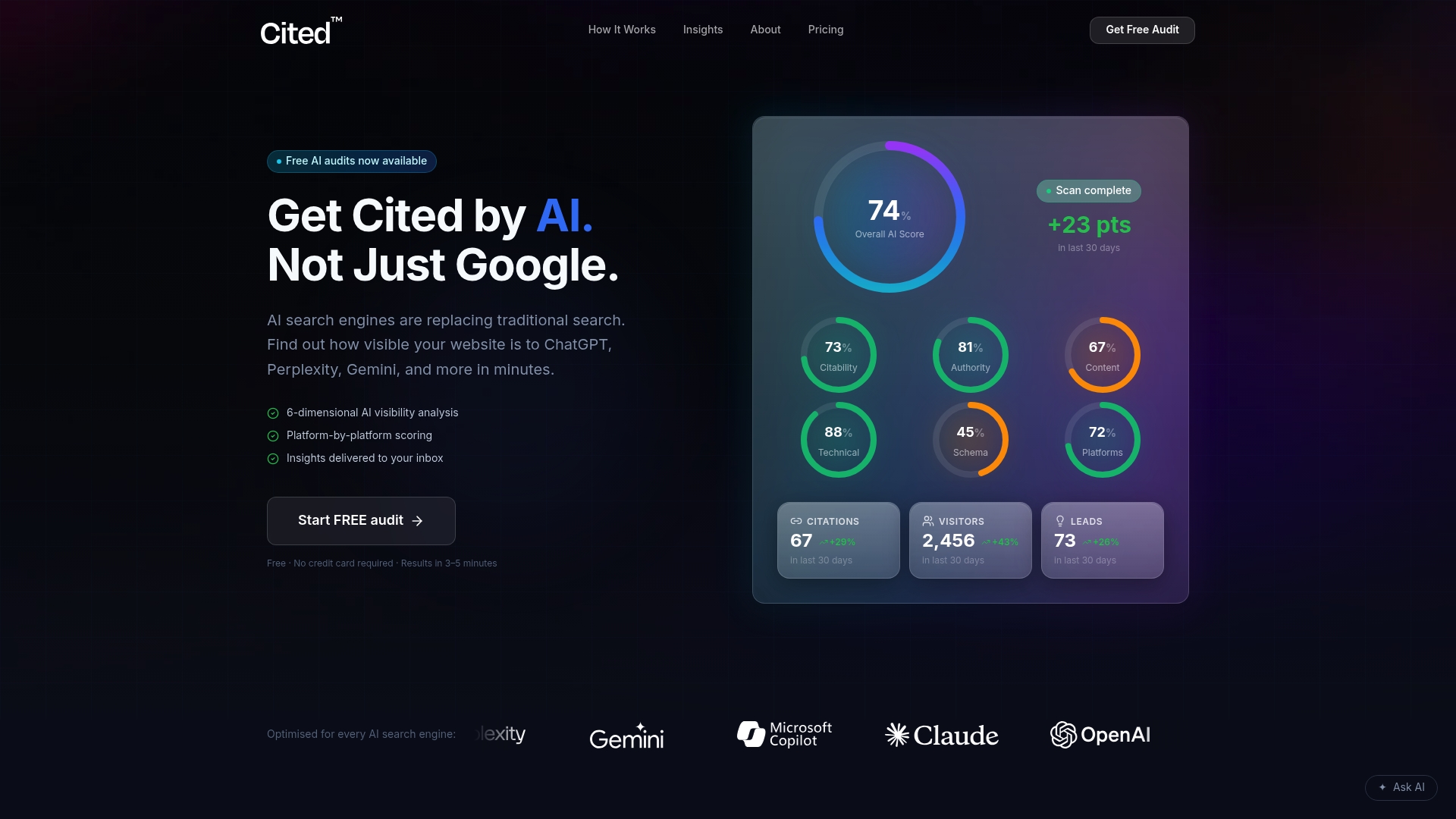
From there, the path is straightforward. If the audit turns up specific technical errors, a one-off Technical Fixes package resolves them directly. For ongoing monitoring and optimisation as OpenAI and other platforms update their crawler behaviour, a managed plan is available, and larger sites can get a custom Enterprise scope. For anyone building integrations rather than fixing visibility, the AmmarAI developer resources are a useful companion reference for OpenAI SDK work. Start with the free AI visibility audit at cited.best/audit, review Cited's audit methodology if you want the detail behind the six dimensions, or book a call directly if you already know you need implementation help.
Where to verify this yourself
- OpenAI bots documentation: official crawler behaviour and IP ranges
- OpenAI quickstart and authentication: API key setup and SDK usage
- OpenAI API reference overview: endpoints, headers and rate limits
- RSS feeds optimised for AI discovery: related discovery signals
Sources
FAQ
Does blocking GPTBot stop ChatGPT from citing my site?
No. GPTBot controls training data collection only. To stop citations in ChatGPT Search, you need to block OAI-SearchBot separately, since the two crawlers are configured independently.
Is ChatGPT-User the same as GPTBot?
No. ChatGPT-User fires when someone asks ChatGPT to fetch a page in real time, while GPTBot and OAI-SearchBot run automated, ongoing crawls for training and search respectively.
Do I need an API key to let OpenAI crawl my site?
No. Crawler access is controlled entirely through robots.txt and IP verification. API keys are only needed if you're building software that calls the OpenAI API directly.
How do I confirm a request claiming to be GPTBot is genuine?
Cross-check the requesting IP address against OpenAI's published IP range files rather than trusting the user-agent string alone, since that string is easy to spoof.
Why is my robots.txt rule being ignored?
Your CDN, WAF, or security plugin is likely blocking the bot before robots.txt is ever read. Check bot-management settings there first, since these layers commonly override robots.txt rules silently.
Recommended
Ready for your AI score?
See how visible your site is to ChatGPT, Perplexity & Gemini.
Start FREE auditResults in minutes · 100% free