
Speakable schema lets Google Assistant read short passages of news articles aloud, but the feature remains limited to US English news publishers and offers no proven SEO benefits outside of audio playback. Most publishers should skip it unless they're already eligible and producing structured, quotable content. If you do implement it, focus on two or three concise passages using stable CSS selectors or IDs, and validate carefully before deploying.
News Publishers: When Speakable Schema Is Worth Implementing in 2026
Speakable schema marks short passages of text so Google Assistant can read them aloud, primarily for news audio. In 2026 the feature remains in beta, restricted to a narrow set of publishers and use cases, so most site owners should not treat it as a priority. If you run an eligible news site, or want cleaner passages for AI extraction, implement it carefully rather than skip it entirely.
***
TL;DR: >- Speakable schema remains limited to US English news publisher sites, with no proven ranking or visibility impact outside assistant-audio features.- Implementations should focus on two to three self-contained passages using stable CSS selectors or IDs, avoiding XPath unless necessary.- Validation tools confirm syntax correctness, but actual visibility depends on eligibility, content structure, and Google Assistant's use cases.- Most errors stem from marking full articles, mixing locator types, or selectors that do not resolve in the DOM; keep content concise and resilient.- The feature's value is mainly for publishers already producing structured, quotable content, with broader SEO benefits limited at this stage.
***
Table of Contents
- What is speakable schema and how does it work?
- How do you implement speakable schema in JSON-LD?
- Who is eligible for speakable, and what does it actually deliver?
- What content and technical guidelines should you follow?
- How do you test and validate speakable markup?
- What are the common mistakes with speakable implementation?
- When does Cited recommend implementing speakable schema?
- Is speakable worth your time in 2026?
- Get your AI visibility checked before you invest in niche schema
- Sources
- FAQ
What is speakable schema and how does it work?
Speakable is a property defined by Schema, applied to Article or WebPage types, with its values wrapped in a SpeakableSpecification. That specification tells a text-to-speech system exactly which parts of a page to read, rather than leaving it to guess at the whole document.
There are three ways to point at that content:
- id references, which target elements by their existing HTML id attributes
- cssSelector, which uses standard CSS selectors to identify passages
- xpath, which locates content by its position in the document tree
Google Assistant uses these marked passages to answer topical news queries with spoken audio, attributing the source as it reads. This is the mechanism, not a general voice search feature. Google's own documentation is explicit that speakable is designed for text-to-speech playback rather than as a ranking factor across search results.
How do you implement speakable schema in JSON-LD?
Google recommends JSON-LD over microdata for speakable, placed in the page's <head> alongside your existing structured data. A minimal WebPage example looks like this:
```
{
"@context": "https://schema.org",
"@type": "WebPage",
"speakable": {
"@type": "SpeakableSpecification",
"cssSelector": [".summary", ".key-points"]
},
"url": "https://example.com/news/article"
}
```
For an Article, the same specification nests inside the article object, ideally alongside headline, datePublished, author and publisher for fuller context.
Follow this sequence when building it out:
- Identify two or three passages that summarise the story on their own.
- Add stable classes or ids to those elements in your template.
- Write the JSON-LD using
cssSelectorfor those classes, oridreferences where the elements already carry unique ids. - Avoid
xpathunless your CMS gives you no other option. It breaks the moment your template changes, and Schema.org's own examples treat it as a fallback, not a default. - Never mix
cssSelectorandxpathfor the same specification. Pick one. - Validate before deploying (covered below).
Pro Tip: Keep id references for your most template-stable elements, like a fixed summary box, and reserve cssSelector for anything that might shift position on the page. That split gives you resilience without the maintenance headache xpath creates.
The most common syntax error is nesting SpeakableSpecification outside the speakable property, or forgetting the @type declaration entirely. Both will fail validation silently in some tools, so check the raw JSON structure line by line.
Who is eligible for speakable, and what does it actually deliver?
Eligibility is narrow. Google's documentation ties speakable to news publishers, English-language content, and Google Assistant devices in the US. Outside that combination, the markup does nothing observable today.
That narrowness has consequences worth stating plainly:
- The product surface is one feature (Assistant-read news audio), not a broad voice search channel.
- There's no documented ranking or visibility boost for organic search results.
- Direct traffic impact is minimal since the output is spoken, not clicked.
Industry coverage of the feature backs this up: speakable has stayed in beta since its 2018 launch, with no meaningful expansion of eligible countries, languages, or platforms in the years since. That stagnation is the strongest signal that Google treats this as a limited experiment rather than a growth feature.
There's a secondary, unconfirmed angle worth knowing about. Some SEO commentary suggests that clearly signposted passages may be easier for AI retrieval systems to extract, since the markup forces you to isolate self-contained, quotable statements. No major AI assistant documents speakable as an input to its citation logic, so treat this as a plausible side benefit rather than a strategy.
What content and technical guidelines should you follow?
Mark passages that make sense read aloud in isolation, roughly two to three sentences or about 20 to 30 seconds of speech. Anything longer defeats the purpose; anything shorter reads as a fragment rather than an answer.
Follow these editorial rules when selecting text:
- Choose passages that don't depend on an image, a table, or a linked reference to make sense.
- Write (or select existing copy) so the sentence stands alone without "as shown above" or "see the chart below".
- Use stable semantic classes or ids on the containing elements, not classes tied to visual styling that a designer might rename.
- Prefer cssSelector over xpath in almost every case; only fall back to xpath when your CMS genuinely offers no other locator option.
Pro Tip: Treat your speakable passage the way you'd treat a pull quote in print. If it wouldn't work lifted out and read on its own, it won't work as a spoken snippet either.
This discipline pays off beyond speakable itself. Concise, self-contained summary text is exactly what helps schema markup earn AI citations more broadly, since extraction systems favour text that doesn't need surrounding context to make sense.
How do you test and validate speakable markup?
Run your JSON-LD through the Schema.org validator and Google's Rich Results Test, but don't expect a visual rich result card. Speakable has no visible search-result preview, so a "valid" reading confirms syntax, not visible impact.
Beyond the automated tools, check these manually:
- Confirm each
cssSelectororidactually resolves to an element in the rendered DOM, not just the source template, since validators don't always catch selectors that match nothing. - Re-check JSON-LD syntax after any template deployment, particularly quote escaping and nested braces.
- Monitor Google Search Console for structured data errors tied to your Article or WebPage markup.
- Where you have access to a US Assistant device, run a manual spoken query against your content as a sanity check.
What are the common mistakes with speakable implementation?
Most failures come from a handful of repeatable errors. Fix these in order:
- Marking whole articles instead of extracts. Speakable exists for short passages, not full-length content; oversized selections get ignored or produce poor audio.
- Mixing cssSelector and xpath in one specification. Pick one locator type per speakable block and stay consistent.
- Selectors that match nothing. A class name that gets renamed during a redesign silently breaks the whole markup.
- Missing parent context. Speakable needs to sit inside a properly typed Article, NewsArticle, or WebPage object, not floating alone in the JSON-LD.
- JSON-LD placement errors. Scripts placed outside the
<head>, or duplicated across templates without updating selectors, both cause validation failures.
Pro Tip: *If you've implemented speakable correctly and see zero measurable change after a few months, that's expected, not a sign of failure. Redirect further schema effort toward types with a visible product surface, like Article schema or Product schema, where the payoff is easier to track.*
When does Cited recommend implementing speakable schema?
Implement it now if you're an eligible news publisher targeting English-language US Assistant users, or if you want more extractable passages for AI retrieval systems even without a confirmed ranking benefit.
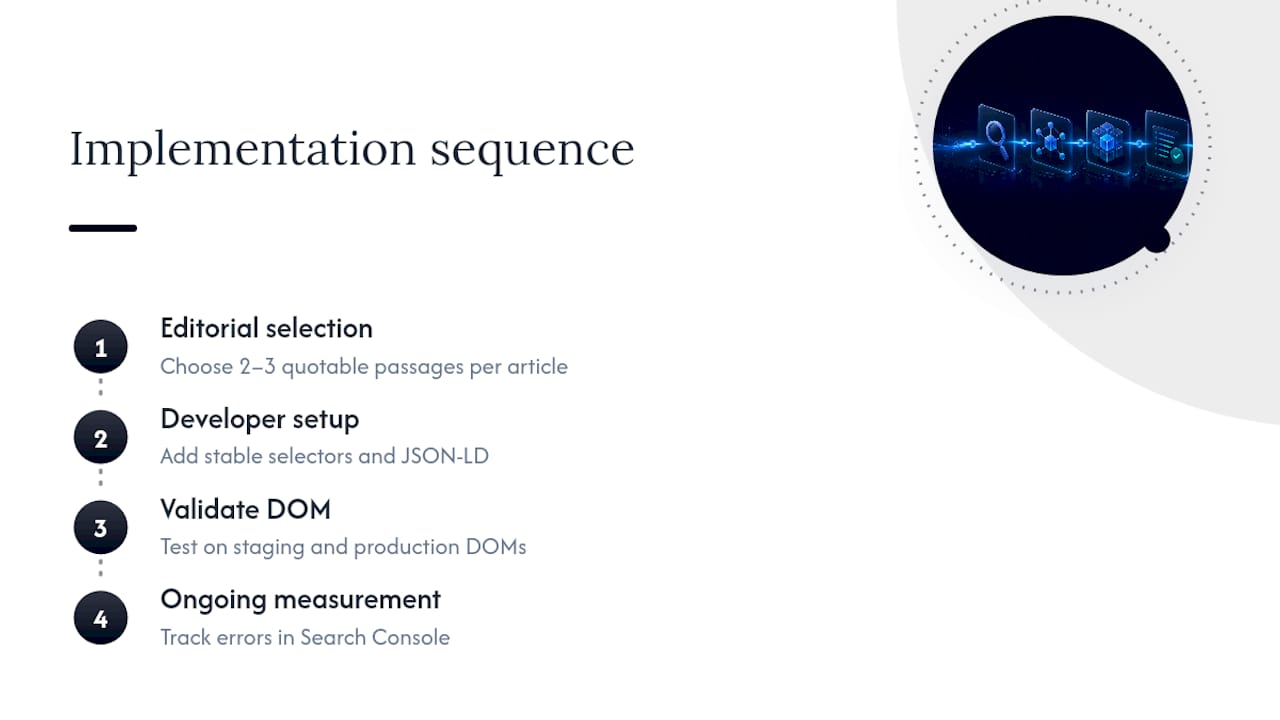
The operational sequence we run for clients follows four steps: editorial selection of two or three quotable passages per article, developer implementation of stable selectors and JSON-LD, validation against staging and production DOM, then ongoing measurement through Search Console error tracking. If you don't fit the eligibility criteria, that effort is better spent on technical SEO fundamentals that support AI visibility across a wider range of platforms than Assistant alone.
Is speakable worth your time in 2026?
Speakable rewards a very specific reader: a news publisher with US, English-speaking audiences already using Assistant devices. For everyone else, it's a low-cost, low-return addition, worth doing only after your core schema and technical foundations are solid.
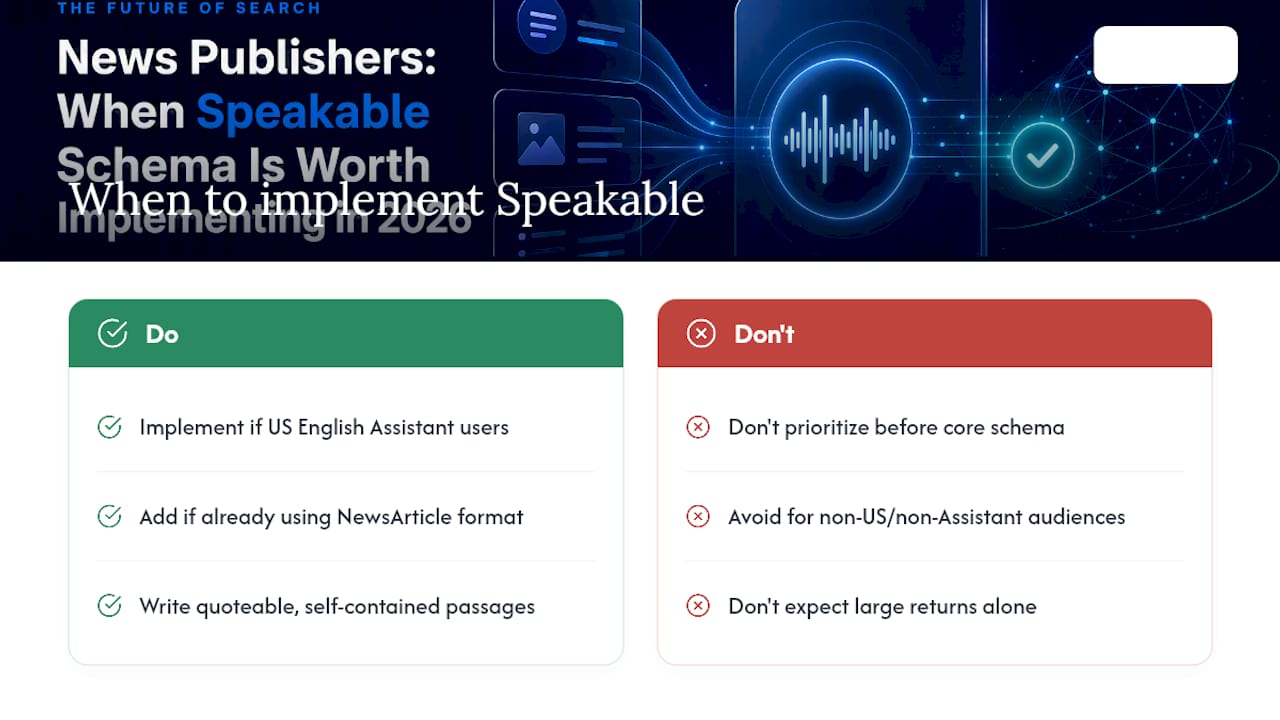
Two scenarios change that calculus. First, if you're already producing NewsArticle content with clear headline and byline structure, the marginal cost of adding speakable is small enough to justify it. Second, if you're preparing content specifically to be quoted by AI systems, the discipline of writing self-contained, extractable passages has value regardless of whether Assistant ever reads them aloud.
Most site owners asking about speakable are really asking a bigger question: is my structured data helping me get found by AI at all? That's worth checking properly with a free audit at cited.best/audit, and our Insights pages go deeper on the schema types that matter more broadly.
— Tom Heaton
Get your AI visibility checked before you invest in niche schema
Cited's free audit tells you whether speakable is even relevant to your situation, rather than guessing based on a generic checklist. Before spending developer time on a beta feature with narrow eligibility, it's worth knowing where your site actually stands across the six dimensions that determine whether ChatGPT, Perplexity, Gemini, Claude, and Copilot cite you at all: technical health, schema markup, authority, and platform coverage among them.
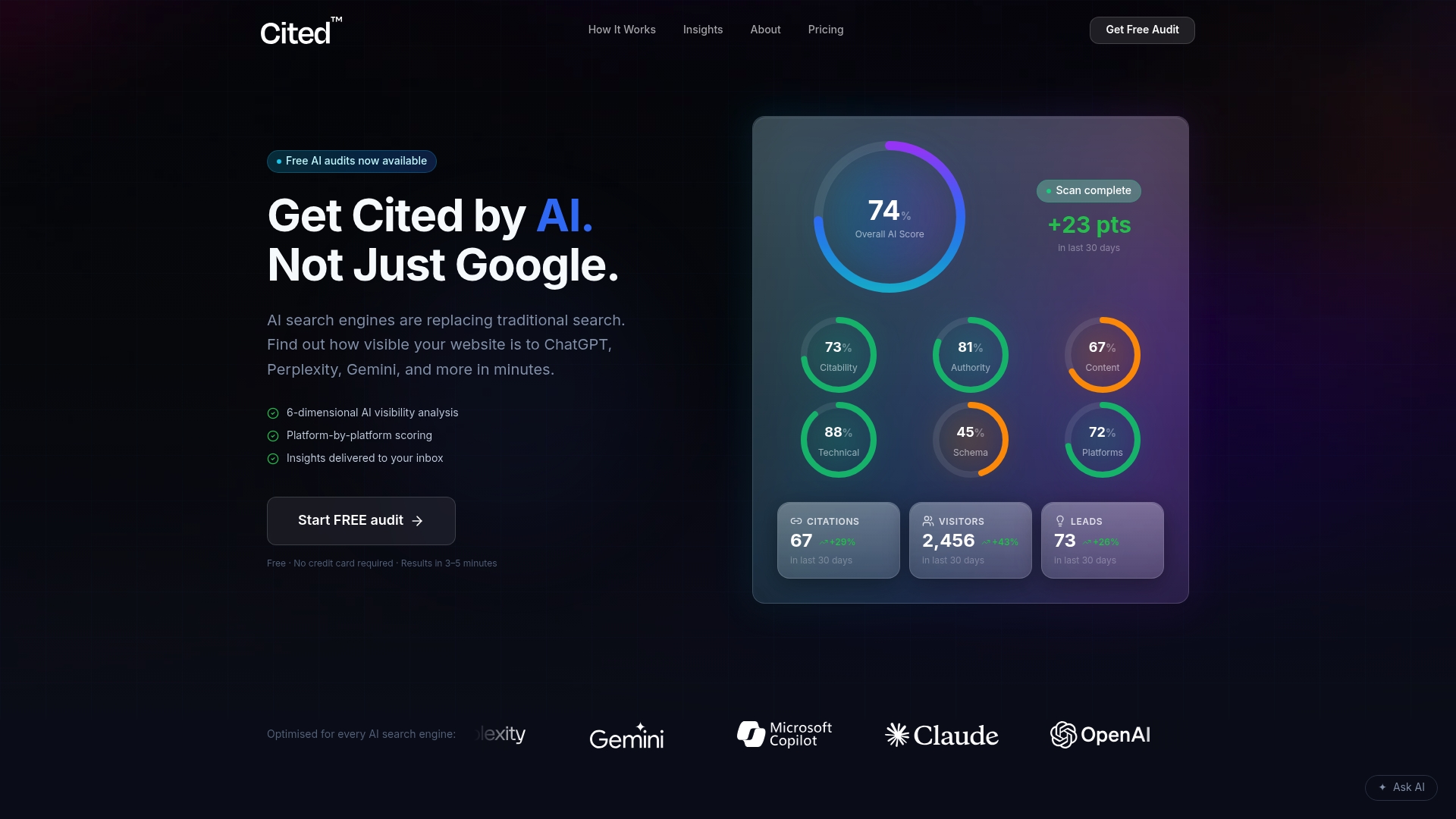
The audit itself is free and takes minutes to run through Cited. If it surfaces gaps, you've got two routes forward: a one-off Technical Fixes package at £495 for issues that need sorting once, or the AI Optimised managed service at £995 a month if you want ongoing implementation and monitoring as platforms change their citation behaviour. Larger organisations with multiple sites or complex publishing setups can get a custom Enterprise quote. Read the audit methodology to see exactly what gets scored, then book a call if you'd rather talk through your results with a person than read a report alone.
Sources
- Speakable (Article, WebPage) structured data (BETA) | Google Search Central
- Schema
- Speakable Schema & voice search SEO: 2026 guide | Dyno Mapper
- Validator
FAQ
What is schema markup used for?
Schema markup is structured data added to a webpage's code that tells search engines and AI systems exactly what a piece of content means, such as a recipe, product, or news article, rather than leaving them to infer it from plain text.
What is a schema in the context of language and web content?
In web content, a "schema" refers to a standardised vocabulary, defined by Schema.org, that assigns specific properties (like speakable or author) to types of content so machines can parse meaning consistently.
How do I know if my website has schema markup?
View your page's source code and search for application/ld+json script tags, or run the URL through Google's Rich Results Test to see which structured data types Google detects.
Can you give an example of schema markup?
A simple example is a SpeakableSpecification block using cssSelector to mark a summary paragraph for text-to-speech, nested inside a WebPage or Article type as shown in Schema.org's documentation.
Recommended
Ready for your AI score?
See how visible your site is to ChatGPT, Perplexity & Gemini.
Start FREE auditResults in minutes · 100% free